
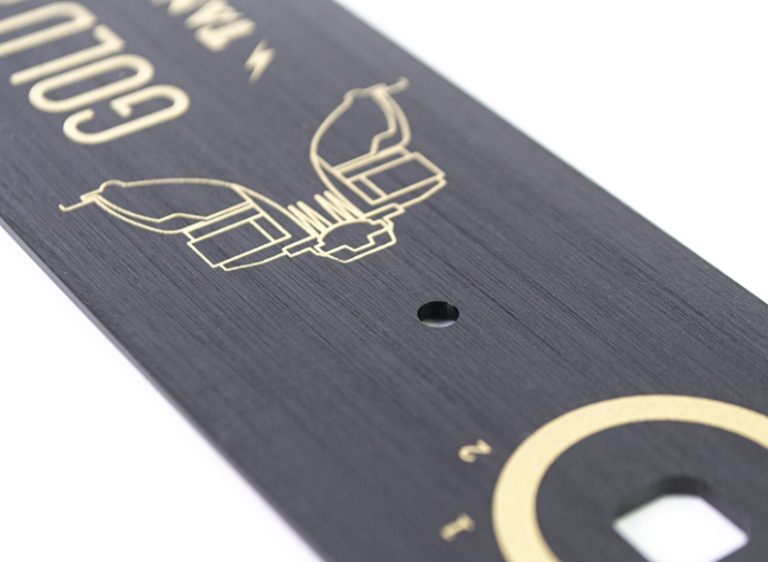
In the competitive world of product development, a standard machined finish often isn’t enough to convey the premium feel of a final product. Wire drawing (also known as brushing) is a transformative surface finishing technique that carves fine, uniform lines into a plastic surface. This process mimics the high-end look of brushed metal, making it a favorite for consumer electronics and household appliance prototypes.
By adding visual depth and a sophisticated tactile feel, wire drawing turns a simple plastic part into a “presentation-ready” model. This guide provides a professional, step-by-step approach to mastering wire drawing in CNC plastic prototype processing, ensuring your models stand out in the boardroom or during user testing.
What is Wire Drawing for CNC Plastics?
Before diving into the technical steps, it is important to understand the value this finish adds. Wire drawing is not just about aesthetics; it serves several functional roles in prototype development. Unlike random sanding, these intentional, parallel lines create a “brushed” texture that effectively hides minor tool marks from the CNC process.
Why use a brushed texture?
- Aesthetic Enhancement: It transforms plain, “plasticky” surfaces into premium-looking components that resemble aluminum or steel.
- Tactile Improvement: The texture increases grip and provides a high-quality hand-feel, which is essential for handheld devices like remote controls.
- Practicality: A brushed surface is far more resistant to visible fingerprints and small scratches than a high-gloss finish.
How to Choose the Right Plastic Material?
Not all plastics react well to the abrasive force of brushing. Selecting a compatible material is the first step toward a successful finish. Below is a guide to the most common CNC plastic materials and how they handle wire drawing.
Material Compatibility Table
| Plastic Material | Compatibility (1-5) | Key Properties | Ideal Line Density | Best Use Case |
| ABS | 5 (Excellent) | Rigid, stable, low melt point | 80–120 LPI | Electronics enclosures |
| PC (Polycarbonate) | 4 (Very Good) | High impact, scratch-resistant | 60–100 LPI | Display covers |
| PMMA (Acrylic) | 4 (Very Good) | Transparent, adds visual depth | 70–110 LPI | Decorative displays |
| PP | 3 (Good) | Flexible, requires light pressure | 50–80 LPI | Soft-grip handles |
| POM (Acetal) | 2 (Fair) | Hard, prone to tool chatter | 40–60 LPI | Mechanical parts |
Pro Tip: ABS is the industry standard for wire-drawn prototypes. It is affordable and produces the crispest, most uniform lines. If your design requires transparency, choose PMMA, but use slower speeds to prevent the tool from melting the surface.
Why is Precision Machining the Base?
A wire-drawn finish can hide small imperfections, but it cannot fix a poorly machined part. You must start with a high-quality CNC plastic prototype.
Guidelines for the Base Part
- Surface Smoothness: Use a fine end mill for the final pass. Aim for a roughness of Ra 1.6 μm or lower. The smoother the base, the better the lines will look.
- Control the Heat: Overheating can warp plastic like ABS. Keep your spindle speeds between 10,000 and 15,000 RPM.
- Account for Material Loss: Wire drawing removes a thin layer (approx. 0.02mm to 0.05mm). Always machine your part slightly oversized—around 0.03mm—to ensure it meets final tolerances.
How to Prepare the Surface Properly?
Contaminants like machining oils or dust can cause the brushing tool to “skip,” leaving unsightly blank spots.
Steps for Surface Pretreatment
- Cleaning: Blow away dust with compressed air. Use 70% isopropyl alcohol and a microfiber cloth to wipe the part. Always wipe in straight lines, not circles, to avoid spreading oils.
- Smoothing: Use 400–600 grit wet sandpaper. Sand lightly in the direction of the intended lines. This removes any tiny burrs that could interfere with the wire drawing tool.
Executing the Wire Drawing Process
Creating the texture requires the right tools and a steady hand (or a well-calibrated machine).
Choosing Your Tools
- Electric Wire Drawing Machine: Best for large, flat panels. It offers the highest line uniformity.
- Manual Wire Brush: Ideal for small parts or tight corners where machines cannot reach.
- Rotary Abrasive Wheel: Best for curved surfaces or rounded edges.
Recommended Parameters
For an electric machine on ABS, set the speed between 1,500 and 2,000 RPM with medium pressure. For PC, drop the speed slightly and use light pressure to avoid surface stress. Always work in continuous strokes and avoid back-and-forth motions, as this can smudge the texture.
How to Refine and Inspect the Finish?
After drawing the wires, the part needs a final cleanup to remove plastic “dust” and burrs.
Post-Processing Steps
Use a soft-bristle brush to remove debris. If the lines feel “fuzzy,” a single light pass with 800-grit wet sandpaper will clean up the micro-burrs without fading the texture. Finally, apply a water-based acrylic clear coat. This protects the texture from fading and increases scratch resistance for user testing.
Quality Inspection Checklist
- Uniformity: Are the lines per inch (LPI) consistent across the part?
- Reflectivity: Does light reflect evenly along the brushed surface?
- Durability: Does the texture stay intact after being rubbed with a cloth 50 times?
- Tolerance: Is the part still within its design specifications after material removal?
Conclusion
Mastering wire drawing in CNC plastic prototype processing is a reliable way to add a “premium” edge to your designs. By selecting the right material—ideally ABS—and maintaining strict control over tool pressure and speed, you can create prototypes that are indistinguishable from high-end manufactured goods. Proper pretreatment and a final protective coating are the “secret ingredients” that ensure your prototypes remain pristine throughout their testing lifecycle.
FAQ
Can I do wire drawing on a 3D printed plastic prototype?
Yes, but you must first fill the layer lines with a plastic filler and sand the surface smooth (Ra 1.6 μm). Without this, the wire drawing tool will snag on the print layers, resulting in a messy finish.
How long does the wire drawing process take?
For a standard 10cm x 10cm panel, the entire finishing process—from cleaning to inspection—takes about 2 to 3 hours. This excludes the 24-hour cure time if you apply a clear coat.
Can I create a “crosshatch” pattern on plastic?
Absolutely. Draw the lines in one direction (0°), let the part cool, and then draw a second set of lines at 90°. Use very light pressure to prevent the intersections from becoming too deep or uneven.
Discuss Your Projects with Yigu Rapid Prototyping
At Yigu Technology, we specialize in high-fidelity CNC plastic prototypes that look and feel like the final product. Our engineering team utilizes precision electric wire drawing machines with ±5 RPM control to ensure perfect line density for every project. From ABS enclosures to decorative acrylic displays, we deliver professional finishes in as little as 1–2 days.
Would you like us to help you determine the best line density for your next project?