
Introduction
If you have a project that needs precise, strong, and repeatable metal parts, you have likely heard the term CNC metal design. But what does it actually mean? In simple terms, CNC metal design is the process of using computer-controlled machines to turn blocks of metal into finished parts. You start with a digital model on your computer. Then, a CNC machine reads that file and cuts away material to create exactly what you designed—down to fractions of a millimeter. No guesswork. No human error. Just consistent, high-quality parts every time. Whether you need one prototype or ten thousand production pieces, this approach saves time, cuts costs, and lets you create shapes that would be impossible by hand. In this guide, I will walk you through everything you need to know, from how the process works to choosing materials and avoiding common design mistakes.
How Does CNC Metal Design Actually Work?
Understanding the basic flow helps you see why this method is so powerful. It is a straightforward process that turns your idea into a real part.
Step 1: You Create the Digital Model
Everything starts with CAD software—that is Computer-Aided Design. Programs like SolidWorks, Fusion 360, or AutoCAD let you build a 3D model of your part. You set every dimension, every hole, every curve. This digital file is the blueprint for everything that follows.
Step 2: The Computer Translates Your Design
Your CAD model gets fed into CAM software (Computer-Aided Manufacturing). This program figures out how to actually cut the part. It decides which tools to use, what paths they should follow, how fast to spin, and how deep to cut. It outputs a file full of instructions called G-code. This is the language your CNC machine understands.
Step 3: You Set Up the Machine
A machinist loads a block of your chosen metal onto the machine table. They bolt it down securely so it cannot move. Then they load the right cutting tools into the machine’s spindle or tool changer.
Step 4: The Machine Does the Work
You hit start. The CNC machine reads the G-code and begins moving the cutting tools through the metal, following your design exactly. Sensors monitor the process to catch any issues. The machine can run unattended for hours, even overnight.
Step 5: You Finish the Part
Once the machine finishes cutting, the part might need extra work. This could be sanding rough edges, polishing surfaces, or adding coatings like anodizing or painting.
Real-World Example: Why This Matters
A friend of mine runs a small shop that makes custom parts for off-road vehicles. A client needed 50 steel brackets for a suspension system. If he made them by hand, each bracket would take about 45 minutes. That is over 37 hours of work. And every bracket would be slightly different because human hands are not perfect.
Using CNC metal design, he spent 3 hours modeling the bracket and setting up the CAM. Then his CNC mill ran overnight and produced all 50 brackets by morning. Each one was identical, with holes positioned within ±0.02mm of the design. The client got better parts in less time, and my friend freed up his days for other work.
What Metals Can You Use for CNC Machining?
Not all metals behave the same way under a cutting tool. Your choice of material affects everything—how easy the part is to make, how strong it is, and how much it costs. Here are the most common options.
| Material | Key Properties | How It Machines | Best Uses | Typical Cost (per kg) |
|---|---|---|---|---|
| Aluminum (6061) | Light, resists rust, good strength | Excellent—cuts like butter | Brackets, enclosures, auto parts | (2.50–)4.00 |
| Steel (A36) | Very strong, durable | Good—needs sharp tools | Frames, machine bases, structural parts | (0.80–)1.50 |
| Stainless Steel (304) | Rust-proof, handles heat | Moderate—work hardens | Medical tools, food equipment | (3.00–)5.50 |
| Brass (C360) | Conducts electricity, polishes well | Excellent—clean finish | Electrical connectors, decorative items | (6.00–)8.50 |
| Titanium (Grade 5) | Super strong for its weight, biocompatible | Difficult—wears tools fast | Aerospace, medical implants | (30.00–)50.00 |
What “Machinability” Means for You
You will hear machinists talk about how easily a metal cuts. This is called machinability. Aluminum and brass are like butter—they cut smoothly, produce nice chips, and do not wear out tools quickly. Stainless steel and titanium are the opposite. They are hard, they generate heat, and they eat up cutting tools. If you try to cut titanium with a standard tool, you might reduce its life by 70 percent compared to using the right carbide tool. Always match your material to the right tooling.
What Are the Main CNC Processes for Metal?
Different part shapes call for different machines. Here are the four most common ways to cut metal with CNC.
CNC Milling: For Complex 3D Shapes
CNC milling uses rotating cutting tools to carve material away from a stationary block. It is the most versatile process.
- 3-axis mills move left-right, front-back, and up-down. They are great for simple parts like flat brackets or boxes.
- 5-axis mills add rotation so the tool can approach from any angle. This lets you make complex shapes like turbine blades or medical implants in one setup instead of many.
Case Study: An aerospace company needed titanium turbine blades with curved surfaces. Using a 5-axis CNC mill, they held tolerances of ±0.005mm. That level of precision is impossible with manual methods. The blades fit perfectly into the engine assembly.
CNC Turning: For Round Parts
CNC turning is for anything cylindrical. The metal bar spins while a cutting tool moves along it, shaving material away. Think shafts, bolts, rollers, and bushings.
- Why it wins: Turning is much faster than milling for round parts. A steel shaft that takes 10 minutes on a mill can be done in 2 minutes on a lathe.
CNC Laser Cutting: For Thin, Intricate Parts
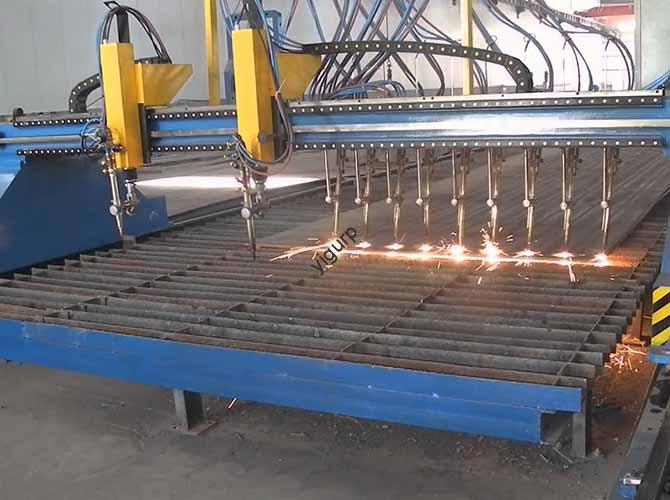
A high-powered laser beam melts or vaporizes the metal along your cutting path. It works best on thin to medium thickness materials (up to about 25mm for steel).
- Best for: Intricate designs like decorative grilles, signs, or parts with fine details. A furniture designer once used laser cutting to make brass table legs with delicate patterns that would be impossible to mill.
CNC Waterjet Cutting: For Thick, Heat-Sensitive Metals
Waterjet cutting uses a high-pressure stream of water mixed with abrasive particles. It cuts by erosion, not heat.
- Key advantage: No heat means no warping. This is critical for metals like titanium that can change shape when heated. Waterjets can cut material up to 300mm thick with tolerances around ±0.1mm. Plus, the water can be recycled, making it an eco-friendly choice.
How to Design Parts That Machine Well
A beautiful CAD model does not always make a good machined part. Here are five tips to keep your design practical and cost-effective.
Use Realistic Tolerances
Tolerance is how much your part can vary from the perfect size and still work. Tighter tolerances cost more money and take more time.
- For most parts, ±0.1mm is fine.
- For precision fits, you might need ±0.02mm.
- For cosmetic features that do not matter, loosen up to ±0.5mm.
The Trap: If you put ±0.01mm on every dimension when only a few matter, you just made your part much more expensive for no benefit. Be selective.
Give Tools Room to Cut
Cutting tools are round. If your design has a sharp inside corner—a perfect 90-degree angle in a pocket—a round tool cannot reach into that corner. You will get a radius equal to half the tool diameter.
- Fix it: Add a radius to internal corners. For a 6mm end mill, use at least a 3mm radius. If you need a sharper corner, you may need a different process or a second operation.
Watch Your Wall Thickness
Thin walls flex, vibrate, and sometimes break during machining. They are trouble.
- Minimums: For aluminum, keep walls above 0.8mm. For steel, go thicker—at least 1.5mm. If you need thin features, add reinforcing ribs to stiffen them.
Simplify Where You Can
CNC machines are powerful, but complexity costs money. Every tiny hole, every intricate curve adds machining time.
- Ask yourself: Does this feature need to be here? For example, a 0.5mm hole in a steel part might be slow to drill and could weaken the part. Could it be 1mm instead? Often, the answer is yes.
Pick Your Material First
Your material choice affects your design. If you design a lightweight part and then decide to make it from steel instead of aluminum, your walls may be too thin because steel is heavier. Decide on the material early and design for that specific metal.
Why Should Your Business Use CNC Metal Design?
The benefits go beyond just making parts. Here is how this approach changes your business.
Unbeatable Consistency
Every part is identical. For a medical device company, this is life-or-death. A surgical tool that varies by 0.1mm might not work correctly. CNC metal design eliminates the variation that comes with human operators.
Speed That Scales
CNC machines run lights-out. You can load material on Friday afternoon and come back Monday morning to a finished batch of parts. A shop making 500 steel bolts might spend 20 hours on manual machines. With CNC, it is 8 hours.
Real Cost Savings
Yes, CNC machines cost money upfront. But they pay off fast.
- Less waste: CNC reduces material waste by 30 to 50 percent compared to manual machining.
- Fewer labor hours: One machinist can run multiple CNC machines.
- Industry data: A study by the Manufacturing Technology Association found that businesses using CNC cut production costs by an average of 25 percent in the first year.
Flexibility to Pivot
Need to switch from making aluminum brackets to brass fittings? Load a new program and go. No retooling, no long changeovers. This makes CNC perfect for shops that do custom work or small batches.
Conclusion
CNC metal design is not just a manufacturing method. It is a way to turn your ideas into reality with precision and speed that manual methods cannot touch. You start with a digital model, choose the right material, and let computer-controlled machines do the heavy lifting. Whether you need one prototype or ten thousand parts, the result is the same: consistent quality, delivered fast, at a predictable cost. By understanding the materials, the processes, and the design rules, you set yourself up for success. In today’s competitive market, that is not just an advantage—it is a necessity.
FAQ About CNC Metal Design
1. How much does CNC metal design cost?
Costs vary widely. A simple aluminum bracket might cost (5 to )15 per part in a batch of 100. A complex titanium aerospace part could be (500 to )2,000 each. The best way to know is to send your CAD file to a few shops for quotes.
2. Can I make just one part with CNC?
Absolutely. CNC is great for prototyping. Unlike injection molding, which requires expensive molds, you can make a single part directly from your design. It will be fully functional and made from your chosen production material.
3. How long does it take to get a CNC metal part?
For a simple part, machining might take 5 to 10 minutes. But you also need time for programming and setup—usually 1 to 4 hours for a straightforward job. Complex parts with 5-axis work can take hours per piece.
4. What file format do I need?
Most shops want a STEP file (.stp or .step) . This format preserves your 3D geometry perfectly. Some also accept IGES or Parasolid files. Always check with your chosen shop first.
5. Can I use recycled metal for CNC machining?
Yes, as long as it is clean and free of contaminants like rust or paint. Recycled aluminum, steel, and brass work well. Using recycled metal saves money and is good for the environment—recycled aluminum uses 95 percent less energy than virgin material.
6. What is the difference between CNC machining and 3D printing metal?
CNC is subtractive—it cuts away material from a solid block. 3D printing is additive—it builds parts layer by layer from metal powder. CNC is faster for simple parts and gives you better surface finish and tighter tolerances. 3D printing is better for extremely complex internal shapes that cannot be machined.
Discuss Your Projects with Yigu Rapid Prototyping
At Yigu Rapid Prototyping, we live and breathe CNC metal design. We have helped hundreds of clients across automotive, medical, aerospace, and consumer goods turn their digital designs into physical reality. Our team does not just run machines—we partner with you. We look at your CAD files with fresh eyes, spotting potential issues before they cost you time and money. We help you choose the right material for your application, balancing performance against budget. And we have the equipment to handle everything from simple 3-axis milling to complex 5-axis work in exotic materials like titanium and Inconel. Whether you need a single prototype to test or a production run of thousands, we deliver consistent quality on your timeline. Contact Yigu today and let us bring your next project to life.