
Introduction
Building a new home theater system is a complex and exciting project. It involves multiple components—a sleek main unit, powerful speakers, a sturdy stand, and a responsive remote—that must all work together seamlessly. The design needs to look great, dissipate heat effectively, and deliver high-quality sound. Before you invest in expensive production molds, you need a prototype to test your design. The CNC machining home theater system prototype process is the ideal way to create accurate, functional, and beautiful models. But what does this process actually involve? This article walks you through the entire journey. We will cover the essential design steps, the core machining work, the finishing touches, and how to test your prototype to ensure it is ready for the living room.
What Design and Preparation Work Is Needed Before Machining?
A great prototype starts with a solid plan. The design stage is where you define every detail that will make your home theater system a success.
Understanding Your System’s Core Requirements
First, define the complete system. What are the components? This typically includes a host unit, speakers, a remote control, a stand, and perhaps a decorative screen frame.
Each component has specific functional needs. The host unit requires a layout of heat dissipation holes (maybe 2-3mm in diameter, spaced 8-10mm apart) to keep the electronics cool. It needs precise cutouts for all its interfaces, such as USB 3.0, HDMI 2.1, and audio ports. It also needs spots for control buttons.
The speakers need a grille with a high ventilation rate (≥70%) so sound can pass through clearly. The stand must be strong enough to hold the host unit securely, with a load-bearing capacity of at least 5kg. The overall appearance should have a matte finish to reduce light reflection, with hidden screws and a uniform color.
Creating 3D Models and Splitting the Design
Use CAD software to create precise 3D models of every part. Aim for a high precision with a tolerance of ±0.05mm. You will then split the complete system into individual, machinable components. This includes:
- Host Unit: Upper and lower shells.
- Speakers: The main housings and the front grilles.
- Stand: The base and supporting brackets.
- Control Panel: The button panel.
- Remote Control Case: Its upper and lower halves.
For future mass production, it is wise to add a small draft slope (≥3°) to vertical walls. This will help parts release from injection molds later. For complex curved surfaces, like on a speaker housing, you can perform topological reconstruction to simplify the shape slightly, making it easier and faster to machine without affecting the look.
Selecting the Right Materials
Choose materials that match each part’s function, are easy to machine, and will look good.
| Component | Recommended Material | Key Reason |
|---|---|---|
| Host Shells / Stand Brackets | Aluminum Alloy 6061/6063 | It is lightweight, strong, and excellent at dissipating heat. Use a thickness of 2-3mm. |
| Speaker Housings / Button Panels | ABS/PC Alloy | It is low-cost, impact-resistant, and easy to machine. Use a thickness of 1.5-2mm. |
| Speaker Grilles / Transparent Parts | Acrylic or PC | Acrylic offers high transparency and can be polished to a clear finish. Use a thickness of 1-1.5mm. |
| Remote Control Case | ABS Plastic | It is lightweight, easy to dye any color, and has a good feel. |
Preparing the Raw Materials
Before machining, you must prepare your material blanks. Cut them slightly larger than the final part, leaving a 0.5-1mm machining allowance. Use a bandsaw for metal and laser cutting for plastics. It is vital to anneal aluminum alloy at 300-350°C for 1-2 hours to relieve internal stress and prevent warping. You should also dry ABS and acrylic at 80-100°C for 2-3 hours to remove moisture, which can cause bubbles during machining. Finally, clean all blanks with alcohol to remove any oil or dirt.
What CNC Machining Preparation Is Needed for a Home Theater System?
With the design ready, you now prepare the tools and plan the machining process.
Selecting Materials and Tools
The right tools are essential for good results.
| Category | Specific Options | Application Scenarios |
|---|---|---|
| Housing Materials | Aluminum alloy plate (2-3mm), ABS/PC plate (1.5-2mm), acrylic plate (1-1.5mm) | Aluminum for the host, ABS/PC for speakers, acrylic for grilles. |
| Structural Parts Materials | Aluminum rod (8-10mm dia. for stand axes), PC sheet (1mm for button panels) | For load-bearing parts and wear-resistant buttons. |
| Roughing Tools | Φ8-12mm flat cutter (metal/ABS), Φ6-8mm flat cutter (acrylic) | For quickly removing material from large parts like host shells. |
| Finishing Tools | Φ4-6mm ball cutter (for curves), Φ1-2mm cutter for details, Φ2-3mm drill bits | For smooth surfaces, precise interface slots, and heat dissipation holes. |
| Special Tools | M3-M6 taps, laser engraver, thread milling cutters | For creating assembly threads and marking functional symbols like “HDMI”. |
Programming and Designing Fixtures
Good planning prevents errors.
CAM Programming:
- Use sub-zone machining. First, machine the outer contours of the parts. Then, machine the internal details like circuit board cavities and grille holes. This avoids interference.
- Use layered cutting. For roughing, set a cut depth of 0.5mm for metal/ABS and 0.2mm for acrylic. For finishing, use a very light cut of 0.1-0.2mm.
- Optimize toolpaths. For example, use contour milling for curved speaker housings and a spiral feed for drilling many grille holes. This prevents visible joint marks.
Fixture Design:
How you hold the part is critical.
- For aluminum alloy and ABS, use a precision vise with soft jaws to avoid scratches, or a vacuum adsorption platform for thin panels.
- For acrylic grilles, use a vacuum table with soft buffer pads to avoid cracking. Add auxiliary supports under thin-walled areas to prevent vibration.
- For stand axes (round parts), use a three-jaw chuck in a lathe to ensure perfect roundness.
How Does the Core CNC Machining Process for a Home Theater System Work?
This is where your design becomes a physical object. The process is broken down into machining the main parts and then the fine details.
Machining the Main Components
Each main part has its own machining steps.
| Component | Roughing Steps | Finishing Steps |
|---|---|---|
| Host Shell (Aluminum) | 1. Mill outer contour to size (e.g., 300x200x50mm), leaving a 0.5mm allowance. 2. Mill the circuit board cavity (depth 10-12mm) and interface slots (e.g., USB: 12x6mm). 3. Drill the array of heat dissipation holes (Φ2mm). | 1. Polish the surface to a smooth Ra1.6-3.2 for a quality texture. 2. Chamfer all edges (C0.5mm) for safety. 3. Tap M3-M4 threaded holes for assembly. |
| Speaker Housing (ABS/PC) | 1. Mill the cylindrical shape (diameter 150-200mm), leaving a 0.5mm allowance. 2. Mill the internal cavity to fit the speaker driver. 3. Cut the grille mounting groove (depth 1mm). | 1. Smooth the cavity walls to Ra3.2. 2. Machine small wire holes (Φ3mm) for audio cables. 3. Deburr all edges. |
| Speaker Grille (Acrylic) | 1. Mill the outer shape to match the housing, leaving a 0.3mm allowance. 2. Drill the grille holes (Φ1.5mm) in a hexagonal array with 3mm spacing. | 1. Mirror polish both sides to achieve high transparency (≥90%). 2. Add a small C0.3mm chamfer on edges to prevent chipping. 3. Carefully clean out all holes. |
| Stand Bracket (Aluminum) | 1. Mill the flat base shape. 2. Machine the vertical support and the host mounting slots. | 1. Polish the surface to Ra1.6. 2. Tap M5 threaded holes for fixing the host. 3. Prepare for anodizing. |
Machining the Key Details
These small features are vital for the system’s function and user experience.
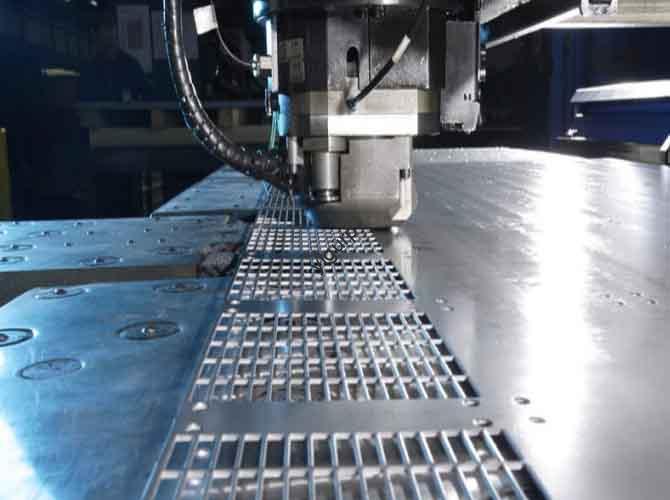
- Heat Dissipation Holes: On the host shell, drill an array of holes with uniform spacing (8-10mm). The total open area from the holes should be at least 30% to allow for good airflow, while leaving enough material for structural strength.
- Interface Slots: Machine the slots for USB and HDMI ports to match the exact standard sizes, leaving a tiny 0.1mm gap for easy plugging. Add a small C0.2mm chamfer on the edges to prevent cables from being damaged.
- Speaker Grille: For curved grilles, use a 5-axis CNC machine to ensure all the small holes are perfectly aligned with the surface. The hole spacing (3mm) is critical to maintain the ventilation rate (≥70%) and ensure good sound transmission.
- Threaded Holes: For all screw holes, first drill a precise pilot hole (e.g., Φ2.5mm for an M3 thread). Then, use a tap to cut the threads. This prevents the material from cracking.
Inspecting Quality During Machining
Check your work as you go.
- Use digital calipers for outer dimensions (tolerance ±0.05mm).
- Use a coordinate measuring machine (CMM) to check critical features like circuit board cavities and grille hole positions (tolerance ±0.03mm).
- Use a surface roughness meter (aim for Ra0.8-3.2 on visible parts).
- Do test fits: check that the host shells mate with a gap under 0.1mm, and that the grille fits snugly in its housing.
What Post-Processing and Assembly Steps Finish the Prototype?
After machining, the parts need finishing and then need to be put together.
Applying the Right Surface Treatment
The right finish makes the prototype look and feel like a real product.
| Material | Surface Treatment Method | Purpose & Effect |
|---|---|---|
| Aluminum Alloy (Host/Stand) | Sandblasting + Anodization | Sandblasting creates a uniform, low-glare matte finish. Anodizing (in black or silver) adds a durable, corrosion-resistant layer. |
| ABS/PC (Speaker Housing) | Painting (matte black/white) + Silk Screen | Painting matches the system’s color scheme. Silk screen printing adds brand logos and interface labels. |
| Acrylic (Grille) | Polishing + Anti-Scratch Coating | Polishing ensures the grille is clear. A thin anti-scratch coating (5-10μm) protects it from daily wear. |
| Button Panels (PC) | UV Coating + Laser Engraving | UV coating makes the buttons highly wear-resistant. Laser engraving creates translucent symbols that can be backlit. |
Assembling and Testing the Prototype
Now, put all the pieces together and see how well they work.
Assembly Process:
- Pre-Assembly Check: Inspect all parts for defects. Gather screws, silicone gaskets (if needed), and audio cables.
- Host Assembly: Fix the circuit board into the lower shell with M3 screws (torque 0.8-1N·m). Snap the button panel into place. Join the upper and lower shells with M4 screws (torque 1.2-1.5N·m).
- Speaker Assembly: Mount the speaker driver inside the housing with small screws. Attach the acrylic grille to the front, using a snap-fit or a very thin layer of double-sided tape. Ensure the fit is even all around.
- Stand Assembly: Fasten the stand bracket to the base with M5 screws (torque 2-2.5N·m). Then, mount the assembled host unit onto the stand, aligning it with the slots and securing it.
- Final Check: Ensure there are no loose parts. Check that all interfaces are perfectly aligned with their cutouts. Place the host on the stand and check for any wobble.
Testing Procedures:
- Functional Tests:
- Interface Test: Plug and unplug USB and HDMI cables 50 times. The connection should remain firm, and the slots should not be damaged.
- Button Test: Press each button 10,000 times. The stroke should feel consistent, and they should never stick.
- Heat Dissipation Test: Run the host unit for 2 hours. Measure the temperature of the circuit board; it should stay below 55°C.
- Sound Test: Play audio through the speakers. There should be no distortion, and the sound should be clear through the grille.
- Aesthetic Tests:
- Check the color consistency (ΔE ≤1.5) under good light.
- Ensure all logos and symbols are sharp and correctly aligned.
- Durability Tests:
- Load Test: Place a 5kg weight on the stand for 24 hours. Check for any signs of bending or deformation.
- Drop Test: Drop the remote control from a height of 1m onto a foam pad. It should not crack or break.
Conclusion
Creating a professional CNC machining home theater system prototype is a detailed process that brings a complex design to life. It starts with a design that considers every component, from the heat-dissipating aluminum host to the clear acrylic speaker grilles. The CNC process then precisely machines each part, creating features like interface slots with ±0.05mm accuracy and arrays of tiny grille holes with perfect alignment. Careful post-processing with techniques like anodizing and polishing, followed by rigorous assembly and testing for fit, function, and sound quality, proves your design. This entire process allows you to see, touch, and hear your home theater system long before mass production, saving time and money and ensuring the final product delivers an exceptional experience.
FAQ
What materials are best for CNC machined home theater system prototype components, and why?
The best material depends on the component. Aluminum alloy 6061 is ideal for the host and stand because it is lightweight, strong, and excellent at dissipating heat. ABS/PC alloy is a great, cost-effective choice for speaker housings. For the speaker grille, especially if you want a sleek, see-through look, acrylic is the best option as it can be polished to a high clarity.
Can a CNC machined prototype accurately test the sound quality of the speakers?
Yes, to a very good degree. Because the speaker housing and grille are machined from the same type of materials (like ABS/PC and acrylic) that would be used in production, and with the correct grille hole pattern and ventilation rate (≥70%), the prototype will provide a very reliable indication of the final sound quality. You can test for clarity, distortion, and overall acoustic performance.
How do you ensure all the different components of the system fit together perfectly?
Perfect fit comes from precision and planning. First, all parts are machined to tight tolerances (like ±0.05mm for the host shells). Second, during the design stage, we create detailed 3D models and run virtual assemblies to check for interferences. Finally, after machining, we perform physical test fits, checking gaps (which should be under 0.1mm) and alignment before final assembly.
Discuss Your Projects with Yigu Rapid Prototyping
Are you developing a new home theater system and need a stunning, functional, and precise prototype? At Yigu Rapid Prototyping, we specialize in the CNC machining home theater system prototype process. Our experienced team understands the importance of combining high-performance functionality with beautiful aesthetics. We can help you select the optimal materials, from aluminum for heat management to acrylic for crystal-clear grilles, and build a multi-component prototype that looks and sounds ready for the big screen.
Contact Yigu Rapid Prototyping today to discuss your audio-visual project. Let’s work together to create a prototype that brings the cinema experience home.