
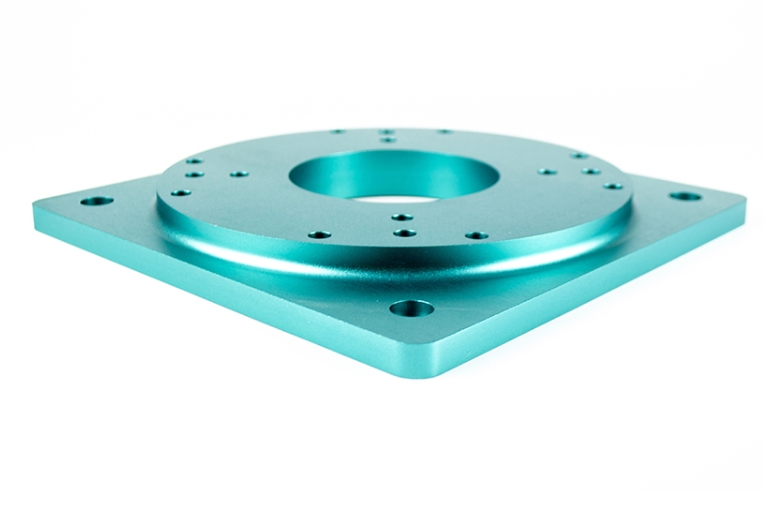
If you are a product engineer or a procurement pro, you know that a great idea is only half the battle. You need to prove it works. Whether you are building automotive parts, medical devices, or industrial tools, prototype CNC machining is your best friend.
Unlike manual work, CNC (Computer Numerical Control) uses pre-set software to carve materials with extreme accuracy. It allows you to test your design in the real world before spending thousands on mass production. This guide will walk you through every step to ensure your prototypes are fast, accurate, and cost-effective.
What Is Prototype CNC Machining?
At its core, prototype CNC machining is a process that uses computer-guided tools to create small-batch models. It follows a digital 3D design to mill or cut materials like aluminum alloys, plastics, or steel into the exact shape you need.
Why does this process matter?
A startup once made a power tool prototype using 3D printing. It looked great, but the plastic handle snapped under real pressure. They switched to CNC machining with aluminum alloy. This functional prototype showed they needed a stronger grip design—saving them three months of rework during mass production.
- Form and Fit: Does your gear actually fit inside the housing?
- Functionality: Can the part survive heat, friction, or torque?
- Early Detection: Find weak spots now so you don’t have to fix them later.
A Step-by-Step Guide to the Process
To get a high-quality part, you must follow a structured path. Rushing one step can lead to errors that ruin the entire workpiece.
2.1 Design and Programming
Everything starts with a CAD model. You create your part in software like SolidWorks with exact tolerances (e.g., ±0.05mm). Then, you use CAM software to write the G-code. This code tells the machine exactly how fast to spin and where to move.
Pro Tip: Always run a toolpath simulation in your software. It lets you “see” the machine work before it touches the metal. This prevents the tool from crashing into your material.
2.2 Selecting the Right Equipment
Not every machine is the same. Your choice depends on how complex your part is.
| Machine Type | Key Features | Best Use Case |
| 3-Axis CNC | Moves in X, Y, and Z. | Simple brackets and flat enclosures. |
| 4-Axis CNC | Adds a rotation (A-axis). | Gears and cylindrical housings. |
| 5-Axis CNC | Rotates on two axes. | Aerospace parts and medical implants. |
2.3 Choosing Materials and Fixation
You should pick a material that matches your final product to get an honest test. For example, use Stainless Steel 304 if your part needs to resist rust. To keep the part steady, use vacuum chucks for thin sheets or soft-jaw clamps for thick blocks to avoid scratching the surface.
2.4 Roughing and Finishing
This is where the shape emerges. Roughing removes 90% of the waste quickly. Finishing uses smaller tools to reach the final size and a smooth look (Ra 0.8 μm).
2.5 Inspection and Finishing Touches
Once the machine stops, you aren’t done.
- Deburring: Remove sharp edges with a tool or sandpaper.
- Cleaning: Use alcohol to wipe away cutting fluid.
- Measurement: Use a caliper or a CMM (Coordinate Measuring Machine) to prove the part is within spec.
Why Choose CNC Over Other Methods?
While 3D printing is popular, prototype CNC machining offers several “unbeatable” perks for professionals.
- Extreme Precision: CNC hits tolerances as tight as ±0.005mm. Manual work can’t even come close.
- Real Materials: You aren’t testing a “plastic version” of a metal part. You are testing the real thing.
- Better Finish: CNC parts look and feel like production-ready products.
How to Overcome Common Challenges?
No process is perfect. Here is how to handle the hurdles of CNC work:
- Cost Concerns: Complex 5-axis parts can be pricey. If your part is simple, stick to 3-axis machining to save about 30%.
- Material Limits: Soft rubbers are hard for CNC. In these cases, try a hybrid prototype—CNC the hard parts and 3D print the soft ones.
- Technical Skill: G-code is hard to learn. Most pros partner with a specialized supplier to handle the “heavy lifting” of programming.
Yigu Technology’s Perspective
At Yigu Technology, we have helped over 400 clients refine their prototype CNC machining projects. We see many teams overcomplicate their designs with features that don’t need to be there. This adds cost and time. We offer a “Design for CNC” review to simplify your model without losing its function. This helps our clients cut their R&D time by an average of 25%.
FAQ
How long does a CNC prototype take?
Simple plastic parts usually take 1–2 days. Complex metal parts that need 5-axis work typically take 3–5 days.
Is CNC more expensive than 3D printing?
For tiny, non-functional plastic parts, 3D printing is cheaper. However, for large or high-strength parts like aluminum automotive components, CNC is often more cost-effective because the raw material is cheaper than high-end resins.
Can CNC handle internal channels?
Yes. By using 4-axis or 5-axis machines, we can carve internal flow paths as small as 1mm in diameter for parts like valves.
Discuss Your Projects with Yigu Rapid Prototyping
Ready to turn your CAD file into a high-precision reality? At Yigu Technology, we provide turnkey prototype CNC machining services with a 2–3 day turnaround for standard parts. Our team ensures every part passes CMM testing before it reaches your door.
Would you like us to review your 3D model and give you a free quote today?