
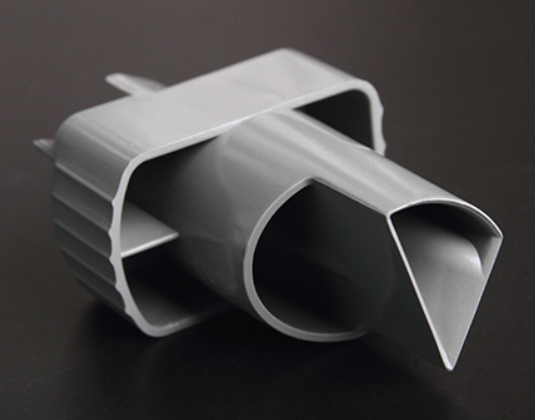
Introduction
For procurement engineers and product designers in the instrumentation industry, creating high-quality prototypes is key to cutting development costs and testing design feasibility before mass production. PC (Polycarbonate) material stands out as the top choice for instrument prototypes, thanks to its exceptional strength, transparency, and impact resistance. Unlike other plastics, PC offers a unique combination of optical clarity and mechanical toughness that makes it ideal for medical displays, industrial control panels, and precision instrument housings. This guide breaks down the entire PC material instrument prototype manufacturing process with real-world examples, data, and practical tips to solve common challenges you will face during development.
Why Choose PC Plastic for Instrument Prototypes?
The first step in prototype making is picking materials that match your product’s functional and aesthetic needs. PC plastic is the gold standard for instrument prototypes, but understanding why helps you make informed decisions.
Comparing PC with Other Prototype Materials
| Material | Key Properties | Ideal Use Cases | Why Choose It |
|---|---|---|---|
| PC Plastic | High impact resistance (60 kJ/m²), transparency (88% light transmittance), heat resistance up to 135°C | Medical device displays, industrial control panels, transparent housings | Best balance of strength, clarity, and heat resistance |
| ABS Plastic | Good rigidity, low cost, easy to paint, impact resistance ~15 kJ/m² | Non-transparent instrument housings, covers, structural parts | Cost-effective when transparency not needed |
| PMMA (Acrylic) | Higher transparency (92% light transmittance) than PC, but more brittle | Optical instrument components, display windows, light guides | Maximum clarity when impact resistance less critical |
| PU Plastic | Flexibility, wear resistance, soft-touch feel | Instrument grips, seals, vibration-damping components | Comfort and flexibility for handheld devices |
Real Case: Medical Equipment Prototype
A medical equipment manufacturer needed a prototype for a new blood pressure monitor. They chose PC plastic for several reasons:
- Impact resistance: PC withstands drops common in hospital settings. The prototype survived 10+ drop tests from 1.2 meters onto tile floors without cracking—critical for a device that might be knocked off carts.
- Transparency: With 88% light transmittance, PC allowed clear visibility of the LCD screen through the protective cover, essential for accurate readings.
- Heat resistance: PC maintains dimensional stability at temperatures up to 135°C, important for devices that may be left near warm equipment.
The PC prototype passed all initial tests, and the design moved forward with confidence. Using a less robust material would have required multiple redesigns.
What Data Collection Ensures Prototype Accuracy?
Accurate data is the foundation of successful prototyping. This stage ensures your final part matches the original design exactly.
Importing and Verifying 3D Design Files
The process starts with your 3D CAD files—typically in STEP, IGES, or native CAD formats. These files are the master blueprint for everything that follows. The prototyping team imports them into CAM (Computer-Aided Manufacturing) software to plan tool paths and cutting strategies.
What your files must include:
- Exact dimensions for every feature
- Tolerances for critical mating surfaces
- Hole sizes and locations with specified fits
- Wall thicknesses throughout the part
- Surface finish requirements for visible areas
Example: A sensor prototype team provided a SolidWorks 3D file that included 0.5 mm diameter holes for sensor wire routing. This detail was critical—without those precisely located holes, the prototype would have required secondary drilling, risking misalignment. The CAM software used this data to program micro-drills that created perfect holes in one operation.
Creating Gypsum Samples for Verification
Before machining expensive PC material, smart prototyping shops create gypsum samples—cheap plaster models that verify shape, curvature, and dimensions. Gypsum is easy and fast to machine, making it ideal for this “test run.”
What gypsum samples catch:
- Shape errors not visible in CAD
- Curvature inconsistencies
- Assembly interference issues
- Aesthetic problems with complex surfaces
Case study: A thermal meter prototype project created a gypsum sample from their CAD file. The sample revealed a 2-degree curvature error in the housing that would have made the device uncomfortable to hold. Fixing the CAD file before machining PC saved 10 hours of rework and prevented scrapping expensive material.
How Does CNC Machining Shape PC Prototypes?
CNC machining is the most reliable method for turning PC plastic into instrument prototypes. It delivers the accuracy and surface finish that precision instruments demand.
CNC Machining Workflow for PC
Programming and setup: Engineers write G-code that guides the CNC machine through every cut. The PC plastic sheet—typically 2–10 mm thick depending on part requirements—is clamped securely to the machine bed. The machine then removes excess material along programmed paths.
Key considerations for PC machining:
- Tool selection: Sharp, polished tools prevent melting and produce clean cuts
- Feed rates: PC requires controlled speeds to avoid heat buildup—typically 300–400 mm/min
- Coolant: Proper cooling prevents stress cracking and maintains dimensional stability
Multi-Axis Machining for Complex Parts
For complex instrument components—like curved housings or parts with compound angles—5-axis CNC machines are essential. These machines can tilt the cutting tool to reach all sides of the part in a single setup.
Advantages of 5-axis machining:
- Improved precision: Accuracy improves by up to 0.02 mm compared to 3-axis machines
- Faster production: Eliminates multiple setups and repositioning
- Better surface finish: Continuous tool paths leave smoother surfaces
Data highlight: A study of 50 instrumentation prototype projects found that CNC machining achieved an average dimensional accuracy of ±0.05 mm—well within the instrumentation industry’s standard requirement of ±0.1 mm for most components. This consistency gives engineers confidence that test results reflect the design, not machining errors.
What Post-Processing Steps Perfect PC Prototypes?
Raw CNC-machined PC parts need finishing work to meet instrument standards for appearance and durability.
Essential Post-Processing Techniques
Deburring: Machining leaves tiny tool marks and sharp edges. Technicians use 400–800 grit sandpaper or ultrasonic tools to smooth every surface. This prevents sharp edges from damaging internal components like circuit boards during assembly. For a control panel prototype, deburring ensured that operators would not cut themselves on edges during testing.
Surface treatment options:
- Painting: Anti-scratch paint—typically polyurethane-based—applied to PC housings improves wear resistance. A temperature controller prototype received this treatment and survived 1,000+ cycles of daily handling without visible wear.
- Silk screen printing: Ink printed directly onto PC surfaces adds labels like “Power Button” or company logos. Properly applied silk screening withstands 500+ rub tests with standard cleaning solutions.
- Electroplating: Metal coatings like nickel can be added to PC parts for conductivity. This is used in prototype connectors for industrial instruments where electrical contact is needed.
How Do You Test PC Instrument Prototypes?
No prototype is ready until it passes thorough assembly and functional tests.
Two Critical Test Stages
Test assembly: All parts—PC casing, internal circuits, displays, and controls—are assembled together. Engineers check:
- Fit: Do all parts align correctly? A pH meter prototype once had a PC lid that would not close properly. Adjusting the CNC machining path based on assembly feedback fixed the issue before production.
- Clearance: Is there enough space for wires and components?
- Fastener engagement: Do screws, clips, or other fasteners work correctly?
Functional testing: The prototype is tested under conditions that mimic real use:
- Structural stability: Drop tests from 1.2 meters onto concrete for portable instruments. A good design survives 10+ drops without cracking.
- Mechanical properties: Tensile tests ensure PC parts don’t break under 50 Newtons of force—typical for instrument knobs and buttons.
- Environmental simulation: Tests at -20°C to 60°C verify PC performance in extreme temperatures. A outdoor weather station prototype maintained dimensional stability and clarity across this entire range.
How Are PC Prototypes Packaged and Shipped?
Safe packaging protects your PC prototype during transit.
Packaging Best Practices
Protective materials: PC parts are wrapped in anti-static foam to prevent electrostatic damage to any sensitive components. They are then placed in corrugated boxes with dividers that prevent movement during shipping.
Documentation: Include a packing list identifying all parts and any special handling instructions. For complex assemblies, include assembly notes or photographs showing how parts should fit together.
Delivery Timeline
Most PC instrument prototypes ship within 5–7 business days of completing testing. This timeline includes:
- Material selection and preparation
- CNC machining
- Post-processing and finishing
- Assembly and functional testing
- Final inspection and packaging
For urgent projects—like prototypes needed for trade shows or investor meetings—expedited production can cut delivery time to 3 days without compromising quality.
What Real Problems Does PC Prototyping Solve?
Here are three cases showing how proper PC prototyping prevented major issues.
Case 1: The Blood Pressure Monitor That Wouldn’t Survive Hospital Use
A medical device company designed a new blood pressure monitor with a PC housing. Their first prototype looked perfect but during drop testing, the screen cover cracked after 3 drops from 1 meter. Analysis showed the wall thickness around the screen was too thin—only 1.2 mm instead of the required 2.0 mm. They updated the CAD model, machined a new prototype, and verified it survived 15 drops. Fixing this before production saved a recall that would have affected 5,000 units.
Case 2: The Industrial Controller That Overheated
An industrial instrument company tested a PC prototype for a new process controller. During environmental testing at 60°C, the housing warped slightly, affecting button operation. Investigation revealed the PC grade they selected had a heat deflection temperature of 125°C—sufficient for the temperature but the part geometry created stress concentrations. They switched to a higher-flow PC grade that filled the mold better, machined new prototypes, and verified no warpage at 70°C. The material change added $0.50 per unit but prevented field failures.
Case 3: The Weather Station That Fogged
A weather instrument manufacturer tested a PC prototype for an outdoor display. During humidity testing, condensation formed on the inside of the transparent cover, obscuring the readout. The issue was not the PC itself but inadequate sealing. They added a gasket feature to the design, machined a new prototype, and retested with 95% humidity for 72 hours—no fogging occurred. Catching this early prevented customer complaints after launch.
Yigu Technology’s Perspective on PC Instrument Prototypes
At Yigu Technology, we have supported over 200 instrumentation clients with PC prototype manufacturing over the years. We believe PC material’s balance of strength, clarity, and workability makes it irreplaceable for early-stage testing.
Our team uses 5-axis CNC machining to achieve the precision that instruments demand—typically ±0.02 mm on critical features. We apply strict post-treatment checks to ensure every prototype meets industry standards for appearance and durability.
For a medical device client developing a new patient monitor, our PC prototypes helped them validate screen visibility under different lighting conditions, button feel during repeated use, and impact resistance for hospital environments. The data they gathered shortened their development cycle by 20% compared to previous projects.
For clients, this means faster design validation and fewer surprises when moving to production. We do not just make parts—we help you build confidence in your product.
Conclusion
The process of creating instrument prototype models from PC materials transforms digital designs into physical devices you can test, validate, and refine. Starting with careful material selection—PC for its unique combination of strength, clarity, and heat resistance—and progressing through precise CNC machining, thorough post-processing, and rigorous testing, each step builds confidence that your final product will perform as intended. Real cases show that companies investing time in proper PC prototyping avoid expensive field failures, accelerate development, and create instruments that meet demanding real-world requirements.
FAQ
Why is PC plastic better than ABS for instrument prototypes?
PC offers significantly higher impact resistance (60 kJ/m² vs. 15 kJ/m² for ABS) and better heat resistance (up to 135°C vs. 80°C for ABS). This makes PC ideal for instruments used in harsh environments like hospitals or factories. PC also provides 88% light transmittance for display-based instruments, while ABS is opaque. The only disadvantage is cost—PC is typically 20-30% more expensive than ABS.
How long does it take to make a PC instrument prototype?
Typical lead time is 5–7 business days from file approval to shipping. This includes material selection, CNC machining, post-processing, assembly, and testing. For urgent projects, expedited production can deliver in 3 days. Complex parts with multiple features or tight tolerances may require the full 7-day timeline.
Can PC prototypes be used for small-batch production of 10-50 units?
Yes. CNC-machined PC prototypes are cost-effective for small batches because they do not require expensive molds. Injection molding—the alternative for high-volume production—only becomes economical for 1,000+ units due to tooling costs that can exceed $10,000. For batches under 100 units, CNC machining is typically the most economical choice.
What accuracy can I expect from CNC-machined PC prototypes?
Modern CNC machining achieves accuracy within ±0.02 mm to ±0.05 mm for well-designed PC parts. This meets requirements for nearly all instrumentation applications, including precision housings, display covers, and mounting features. Critical dimensions like hole locations can hold ±0.01 mm with careful programming.
What surface treatments work best for PC prototypes?
For most applications, deburring is essential to remove sharp edges. For improved scratch resistance, anti-scratch paint (polyurethane-based) works well. For labels and markings, silk screen printing with solvent-based inks provides durability. For conductive applications, electroplating with nickel or copper can be applied. Avoid aggressive solvents that can craze or crack PC.
Do PC prototypes need special testing?
Yes. In addition to standard fit and function tests, PC prototypes benefit from:
- Impact testing to verify durability
- Heat deflection testing if used near warm equipment
- UV exposure testing for outdoor applications
- Chemical resistance testing if exposed to cleaners or solvents
What file formats do you need for PC prototypes?
We prefer STEP (.stp) or IGES (.igs) files for their clean geometric data transfer. For complex organic shapes, STL files can work but may need additional smoothing. Always include 2D drawings with critical tolerances, material callouts, and surface finish requirements—especially for features that mate with other components.
Discuss Your Projects with Yigu Rapid Prototyping
Ready to move your instrument design forward with confidence? The engineering team at Yigu Rapid Prototyping brings deep expertise in creating instrument prototype models from PC materials for medical, industrial, and consumer applications.
We help you select the right PC grade—standard for most applications, UV-stabilized for outdoor use, or high-flow for complex geometries—and refine designs for manufacturability and performance. Our 5-axis CNC machining delivers prototypes that match your production goals within ±0.02 mm accuracy, with typical 5–7 day turnaround.
Whether you need a single display cover or multiple iterations for complete instrument validation, every prototype ships with inspection reports and material certifications so you have complete documentation for your team.
Let our engineers review your CAD files and provide a free feasibility analysis and quote. We will recommend the optimal manufacturing approach based on your specific requirements. Contact Yigu Rapid Prototyping today to discuss how we can support your instrument development and help you bring better products to market faster, with fewer surprises and lower development costs.