
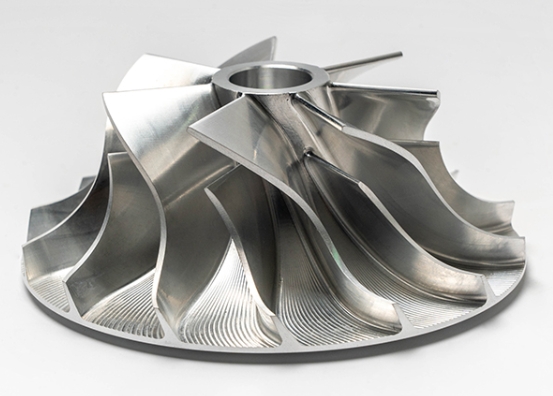
Creating a prototype is a pivotal moment in product development. It is the bridge between a digital concept and a physical reality. However, for many engineers and startups, the bill for CNC prototype costs can come as a shock. It is easy to assume that a single part should be cheap, but CNC machining is a premium process driven by labor, machine time, and precision. If your design is not optimized, you might end up paying double or triple what is necessary.
This guide is designed to pull back the curtain on how machine shops calculate their fees. We will explore the five main factors that drive expenses, provide a deep dive into design for manufacturability (DFM), and offer four proven strategies to slash your budget without losing quality. By the end of this article, you will know exactly how to get a functional, high-quality prototype at a fraction of the usual price.
What Drives Your CNC Prototype Costs?
Before you can lower your expenses, you must understand where the money goes. In a professional shop, CNC prototype costs are not just about the “price of the metal.” They are a combination of material, machine time, human labor, and specialized tooling. If you can target the high-cost variables, you can see immediate savings.
Material Choice Matters
The raw material you choose is your first major expense. Prices for metal and plastic fluctuate based on market demand, but the “machinability” of the material also matters. A material that is hard to cut wears down tools faster and requires slower machining speeds, which increases the hourly rate.
| Material Type | Example Alloy | Cost per kg (USD) | Machinability | Best For |
| Aluminum | 6061 | $\$2–\$5$ | Excellent | General prototypes, weight-sensitive parts |
| Steel | 1018 | $\$0.80–\$3$ | Good | Strong, low-cost structural tests |
| Stainless Steel | 304 | $\$4–\$8$ | Fair | Corrosion-resistant or medical parts |
| Titanium | Ti6Al4V | $\$30–\$50$ | Poor | Aerospace or high-heat applications |
| Plastic | Acetal (Delrin) | $\$5–\$10$ | Excellent | Low-friction, durable plastic tests |
Expert Insight: I once worked with a client who insisted on using Stainless Steel 316 for a simple fit-check bracket. The material was not only more expensive but also took three times longer to machine than Aluminum 6061. By switching to aluminum, they saved $120 per part and the prototype served its purpose perfectly.
Does Tolerance Increase Price?
Tolerance is the allowable margin of error for a dimension. While a CNC machine can achieve incredible precision, asking for it on every surface is a costly mistake. Tighter tolerances require the machinist to move the tool slower, perform more frequent measurements, and use high-end finishing tools.
- Standard Tolerance ($\pm 0.1\text{ mm}$): This is the “sweet spot.” It is easy for any modern mill to hit without extra effort.
- Tight Tolerance ($\pm 0.01\text{ mm}$): This often requires a second “finishing pass” and increases CNC prototype costs by 20% to 50%.
- Ultra-Tight ($\pm 0.005\text{ mm}$ or less): This might require a climate-controlled room and a CMM (Coordinate Measuring Machine) for inspection. Expect the cost to double.
Complexity and Machining Time
The more “features” your part has, the more the machine has to move. Features like draft angles, deep cavities, and tiny internal radii require specialized tool paths.
A major hidden cost is the number of setups. If a part has features on all six sides, a human must manually stop the machine and flip the part six times. Each flip adds labor time and increases the risk of error. If you can design your part so it can be machined in one or two setups, you will see a massive drop in the final quote.
Setup Costs and Quantity
In the world of prototyping, the first part is always the most expensive. This is because of the setup fee. This fee covers the time it takes for an engineer to write the G-code, select the tools, and calibrate the machine.
| Quantity | Setup Fee (USD) | Machining per Part | Total Cost | Cost per Part |
| 1 | $\$150$ | $\$50$ | $\$200$ | $\$200$ |
| 3 | $\$150$ | $\$150$ | $\$300$ | $\$100$ |
| 5 | $\$150$ | $\$250$ | $\$400$ | $\$80$ |
As you can see, ordering three parts instead of one cuts your per-part cost in half. This is the most effective way to optimize your budget.
The Price of Finishes
Do you need your prototype to be shiny, or does it just need to work? Many designers add anodizing, powder coating, or laser engraving to their prototypes. While these make the part look like a finished product, they are often unnecessary for early-stage testing. An as-machined finish costs nothing. Anodizing can add $\$20$ to $\$50$ to a small batch.
How to Lower Prototyping Expenses?
Reducing CNC prototype costs does not mean you have to settle for a bad part. It means you are choosing to be efficient. Use these four strategies to trim the fat from your next purchase order.
Tip 1: Prioritize Needs Over Wishes
The biggest killer of a budget is “scope creep.” It is tempting to make a prototype that looks and acts exactly like the final product. However, early prototypes are for validation.
Ask yourself: “What am I testing?”
- If you are testing the fit of a battery, use plastic instead of metal.
- If you are testing mounting points, skip the aesthetic surface polishing.
- If you are testing airflow, don’t worry about the color of the anodizing.
Case Study: A startup was developing a new drone frame. Their initial quote for a titanium prototype was $\$250$ per unit. We suggested switching to Aluminum 7075, which offers high strength but much better machinability. By also relaxing the tolerance on non-critical edges, the price dropped to $\$45$. They were able to order five versions for the price of one.
Tip 2: Simplify Your Design
Designers often bring habits from other industries into CNC. For example, if you are used to injection molding, you might add draft angles to every wall. In CNC, a draft angle is actually more difficult to machine because it requires a ball-nose end mill and thousands of tiny “stepping” movements.
- Use Standard Tool Sizes: Design your internal corners to match standard end mill radii (e.g., $3\text{ mm}$ or $6\text{ mm}$). If you design a $1.73\text{ mm}$ radius, the shop has to buy a custom tool.
- Avoid Deep Pockets: Tools are like pencils; the longer they are, the more they vibrate. Keep your pocket depth to less than $4\text{x}$ the tool diameter.
- Simplify Holes: Use standard drill bit sizes. Tapping a non-standard thread will always cost more.
Tip 3: Use the Power of Batching
Never order just one prototype if you think you might need a second one later. Because the setup fee is a flat rate, the “second part” is essentially just the cost of material and a few minutes of machine time.
Ordering a small batch (2–5 pieces) gives you spares for:
- Destructive Testing: You can push one part to its limit without worrying about ruining your only sample.
- Parallel Testing: Give one part to the electronics team and one to the mechanical team at the same time.
- Iteration: You can ask the shop to machine two slightly different versions in the same run to see which fits better.
Tip 4: Choose the Right Provider
Not every machine shop is equipped for prototyping. Some shops are set up for mass production and find small orders disruptive. They will “no-quote” you or give you a very high price.
Look for on-demand manufacturing networks or specialized prototype shops. These providers use software to automate the quoting and programming process, which lowers the overhead cost passed on to you. Competition in these networks also keeps prices transparent. An in-house shop might charge you for “lost opportunity” time, whereas an on-demand service finds a machine that is already sitting idle.
Real-World Cost Case Study
Let’s look at a common scenario. A company needs a protective housing for an industrial sensor. Here is how small changes led to a 68% cost reduction.
The Original Request:
- Material: Titanium (High strength, but overkill for a housing).
- Tolerance: $\pm 0.005\text{ mm}$ (The sensor has a $1\text{ mm}$ gap, so this was unnecessary).
- Design: Included a 3-degree draft angle for “looks” and a custom engraved logo.
- Quantity: 1 unit.
- Total Quote: $\$110$
The Optimized Request:
- Material: Switched to Acetal (Delrin). It is durable, light, and very fast to machine.
- Tolerance: Switched to Standard $\pm 0.1\text{ mm}$.
- Design: Removed the draft angle and the logo.
- Quantity: Ordered 2 units.
- Total Quote: $\$70$ (Only $\$35$ per part!)
The optimized version was delivered in three days instead of seven and performed perfectly for the sensor fit-check.
Yigu Technology’s Perspective
At Yigu Technology, we believe that the most expensive prototype is the one that prevents you from moving forward. Our goal is to help you reach the “production-ready” stage as quickly and cheaply as possible. We focus on value-driven engineering.
When a client sends us a file, our first step is to perform a DFM analysis. We look for “red flag” features that will drive up CNC prototype costs without adding function. We often suggest material alternatives or design tweaks that can save 30% of the budget in the first five minutes. By leveraging our network of specialized low-volume manufacturers, we ensure that you aren’t paying “big factory” overhead for a “small shop” job. We don’t just cut metal; we optimize your path to market.
FAQ About CNC Prototype Costs
1. Is it always cheaper to use Aluminum 6061 for CNC prototypes?
Almost always. It is the industry standard for a reason. It is incredibly easy to machine, which means shorter machining times and lower labor costs. Unless your part needs to survive extreme heat ($>200^\circ\text{C}$) or highly corrosive chemicals, aluminum is your best financial bet.
2. How much does a typical CNC prototype cost?
For a simple aluminum part with standard tolerances, expect to pay between $\$50$ and $\$100$. For complex, multi-sided parts in hard metals like titanium or stainless steel, the price can easily climb to $\$200–\$500$.
3. Can I reduce CNC prototype costs without changing my design?
Yes. The best way is to order more than one. By spreading the setup fee over three or five parts, you can reduce the price per unit by up to 60%. You can also choose a provider that specializes in rapid prototyping rather than a general machine shop.
4. Why is my “plastic” prototype so expensive?
People often assume plastic should be cheap. However, in CNC, you are paying for machine time, not just material. If a plastic part is complex, it takes just as long to program and set up as a metal part. If you just need a cheap plastic part and don’t care about strength, 3D printing might be a better alternative.
5. Do I need to pay for a “finish” on my prototype?
Usually, no. An “as-machined” finish (which usually has an Ra of 3.2 or 1.6) is smooth enough for 90% of functional tests. Only pay for anodizing or polishing if you are presenting the prototype to an investor or a customer.
Discuss Your Projects with Yigu Rapid Prototyping
Is your project stuck because of high manufacturing quotes? Let us help you find a better way. At Yigu Rapid Prototyping, we specialize in helping engineers bridge the gap between “perfect design” and “manufacturable part.” Our senior engineers will work with you to analyze your CAD files, identify cost-drivers, and provide a transparent, competitive quote that fits your budget. Whether you need a single proof-of-concept or a small bridge-production run, we have the expertise to make it happen. Would you like me to perform a free DFM review on your current design to see where we can save you money?