
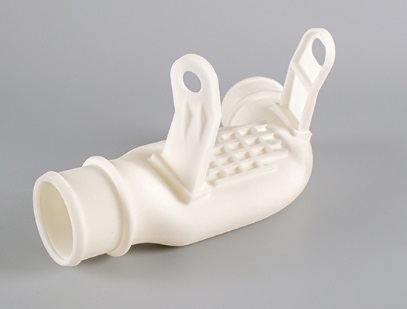
Stereolithography (SLA) 3D printing is famous for its incredible precision and smooth surface finish. It is the top choice for parts that need high detail, fine features, and tight tolerances, from dental guides to microfluidic devices and intricate jewelry. But this power comes with specific rules. To truly unlock SLA’s potential, your design must work with the process, not against it. This guide provides a complete set of SLA design guidelines for engineers and designers. We will cover the essential rules for wall thickness, overhangs, holes, assemblies, and fine details, ensuring your parts are not only possible to print but also strong, functional, and dimensionally accurate.
What Makes SLA Unique?
SLA uses a vat of liquid photopolymer resin cured by a focused UV light source, building parts layer by layer. This process creates isotropic parts with mechanical properties that are uniform in all directions, unlike the layer-dependent strength of FDM. The achievable feature resolution is exceptionally high, often down to 25-100 microns (0.025-0.1mm). Understanding this helps explain the design rules: we are working with a liquid that transforms into a solid under light, which has implications for trapped volumes, suction forces, and support needs.
How to Master Fundamental Geometry?
Successful SLA design starts with respecting the basic limits of the technology related to size, strength, and support.
What Are the Size and Tolerance Limits?
Every SLA printer has a defined build volume, but the true limits are often set by the resin’s behavior and post-processing needs.
- Maximum Practical Size: While printers like the Form 3L can build large parts, very large, solid sections increase curing time, resin cost, and risk of warping. A practical guideline is to keep the longest dimension under 300mm for most standard resins to manage these factors.
- Realistic Tolerances: SLA can hold impressive tolerances. For small, critical features, aim for ±0.1 mm to ±0.2 mm. For overall part dimensions below 100mm, a general rule of ±0.15% of the dimension (with a ±0.1 mm minimum) is achievable with a well-tuned machine.
- Minimum Feature Size: Reliably printable features like pins or text embossing should be at least 0.4-0.5 mm in width/diameter. Extremely fine details down to 0.2 mm are possible but require expert calibration and may be fragile.
Case in Point: A medical device company designed a surgical cutting guide with 0.5 mm alignment pins and ±0.1 mm bore tolerances. Using a high-resolution dental resin and professional-grade SLA printer, they achieved perfect fit and function for a custom patient-specific tool.
How Thick Should Walls Be?
Wall thickness is critical for structural integrity and successful printing. Thin walls fail; thick walls waste resin, increase print time, and can cause cracking.
- Minimum Supported Wall: A wall connected to other structures on most sides can be as thin as 0.4 mm. This is common for internal ribs, lattice structures, or thin enclosures.
- Minimum Unsupported Wall (Isolated): A free-standing wall or a large, flat surface needs more thickness to resist warping and breakage. The absolute minimum is 0.6 mm, with 1.0 mm being a much safer, more robust standard for general parts.
- Uniform Wall Thickness: A core principle is to keep wall thickness as uniform as possible across the part. Sudden thick-to-thin transitions create internal stresses during curing, leading to warping or cracks. Use fillet radii to transition between sections of different thickness smoothly.
How to Design Features for Success?
Specific part features require careful planning to print correctly and function as intended.
What Are the Rules for Overhangs and Bridges?
SLA requires supports for most overhangs, but smart design can minimize them, saving time and improving surface finish.
- The Self-Supporting Angle: A well-known guideline is that overhangs up to a 45-degree angle can often print without supports, depending on the resin. However, for a guaranteed clean result, it’s best to design with a 30-degree maximum for unsupported overhangs.
- Bridging: SLA can bridge gaps surprisingly well. A bridge (a horizontal span between two vertical supports) can be up to 10-15 mm in length without sagging if it’s not too thick (e.g., 1-2 mm). Longer bridges will need support structures underneath.
- Support Strategy: Even when supports are needed, design can help. Place critical cosmetic or functional surfaces (like a lens housing interior or a sealing face) in orientations that minimize support contact on those surfaces. Supports leave small, sandable marks.
How Do You Design Holes and Channels?
Internal cavities, holes, and fluid channels are common but tricky.
- Minimum Hole Diameter: For through-holes, a diameter of 0.8-1.0 mm is a safe minimum to ensure uncured resin can drain out and the hole remains open. Smaller holes can be printed but risk blockage.
- Drainage for Blind Holes and Cavities: This is a major pitfall. Any enclosed hollow volume will trap liquid resin inside. You must add drain holes (at least two) to allow resin to flow out during printing and for cleaning. Drain holes should be at least 3.0 mm in diameter to facilitate washing and curing of the interior.
- Horizontal vs. Vertical Holes: Orient important holes parallel to the build platform (vertical) when possible. Horizontal holes are more likely to deform into an oval shape and may need extra supports.
Real-World Example: An engineering team designed a compact manifold for a fluidic device with internal channels 0.8 mm x 1.2 mm in cross-section. They incorporated two 3.5 mm drainage ports on non-critical faces. This allowed for complete resin evacuation and post-curing, resulting in a fully functional, leak-free part.
How Do You Create Moving Assemblies?
SLA can print fully assembled, interlocking mechanisms in one build—a unique advantage.
- Clearance for Moving Parts: For parts designed to move (like hinges, gears, or snap fits), you must include clearance between surfaces. A safe starting point is a per-side clearance of 0.2-0.3 mm. For a pin in a hole, this means designing the hole 0.4-0.6 mm larger than the pin diameter. Test and adjust based on your specific resin’s shrinkage and stickiness.
- Snap-Fit Joints: SLA resin can be brittle. Design snap-fits with long, flexible arms and generous fillet radii at the base to avoid stress concentration and breakage. Allow more clearance than you would for injection-molded plastic.
How Do You Handle Fine Details and Text?
SLA excels at surface detail, but legibility and durability require forethought.
- Embossed vs. Engraved Text: Embossed (raised) text is more durable than engraved (recessed) text, which can fill with paint or debris. For embossed text, a height of 0.5 mm and a line width of 0.8 mm ensures clarity. For engraved text, depth and width should be at least 1.0 mm.
- Escape Holes for Large, Flat Areas: Very large, flat surfaces printed parallel to the build plate can create significant suction forces when the print plate peels away from the resin vat’s flexible bottom (in LCD/MSLA printers). This can damage prints. Adding small “suction relief” holes or features to break the seal can dramatically improve reliability.
How Does Orientation Impact the Part?
Part orientation on the build platform is a critical decision that affects quality, strength, and support needs.
- Minimizing Supports: Orient the part to reduce the area and number of overhangs needing support. This saves material, reduces post-processing labor, and preserves surface quality.
- Optimizing Critical Surfaces: Place the most critical cosmetic or functional surfaces at an angle or facing upward, where they will have the best finish and no support marks.
- Managing Forces during Print: Consider the peel force each layer experiences. Orienting a large, flat surface at an angle reduces the cross-sectional area peeling at once, leading to a more reliable print.
- Strength Considerations: While SLA parts are isotropic, very thin, tall features printed vertically might be more prone to breaking during handling vs. if they were printed at an angle.
What About Material Selection and Post-Processing?
Design choices must account for the specific resin and the necessary finishing steps.
- Resin Type Dictates Function: Are you printing a prototype, a dental guide, or a final-use part? Standard resin is for looks. Tough or Durable resins (like Siraya Tech Blu or Formlabs Tough) allow for functional parts that bend and absorb impact. High-Temp or Castable resins serve specialized needs. Choose first, then design for that material’s properties.
- Design for Post-Processing:
- Support Removal: Ensure supports can be accessed and removed without breaking delicate features.
- Curing: All SLA parts require post-curing under UV light to achieve full strength. Design parts so UV light can reach all surfaces, or account for potential under-cured sections in non-critical areas.
- Finishing: If parts will be sanded, painted, or plated, avoid ultra-fine surface textures that will be lost. Design with slightly more generous radii to make sanding easier.
Conclusion
Mastering SLA design guidelines transforms the technology from a simple prototyping tool into a powerful manufacturing solution for precision parts. By respecting the rules of minimum feature size, uniform wall thickness, proper drainage, and intelligent orientation, you can consistently produce parts that are dimensionally accurate, structurally sound, and functionally elegant. The key is to design not just for the final shape, but for the entire SLA process flow—from the liquid resin in the vat to the post-cured part in your hand. With these principles, you can push the boundaries of detail and complexity while ensuring reliable, high-quality results every time.
FAQ
Why do my SLA parts sometimes warp or curl, even with supports?
This is often due to excessive internal stress from poor design. The main culprits are large, thick, solid sections that cure unevenly and sharp corners that concentrate stress. To fix this, hollow out thick parts with uniform wall thickness (adding drainage holes), and use generous fillet radii on all internal corners. Orienting the part to minimize the cross-section of each layer can also help.
Can SLA print threads, and how should I design them?
Yes, SLA can print excellent threads. For best results, design metric or UNF threads larger than M6 (or 1/4″). For smaller threads, it’s often better to print a smooth hole and tap it after printing and curing, or design the part to accept a press-in brass insert. If printing threads directly, orient them vertically (parallel to the build plate) for the most accurate form.
How do I calculate the correct shrinkage allowance for a critical dimension?
SLA resins shrink slightly during curing, typically 0.3% to 0.8%, depending on the resin. For a critical 100mm dimension, you might need to scale the CAD model to 100.3mm to 100.8mm. The best method is to print a calibration part with your specific resin and printer settings, measure the deviation, and apply a scaling factor in your slicer or CAD software for future prints.
Is it possible to print clear, transparent parts with SLA?
Yes, but achieving optical clarity requires extra steps. You must use a clear resin and orient the part to minimize layer lines on optical surfaces. After printing, parts will be translucent. To make them truly clear, you need a multi-step post-process: sand with progressively finer grits (up to 2000+), then polish with a liquid polish, and finally apply a clear coat to restore the surface. Design parts with this labor-intensive process in mind.
Discuss Your Projects with Yigu Rapid Prototyping
Navigating the intricate design rules of SLA printing can be complex, but you don’t have to do it alone. At Yigu Rapid Prototyping, our engineers specialize in Design for Additive Manufacturing (DfAM) for high-precision SLA. We can review your designs, suggest optimizations for printability and strength, select the ideal resin for your application, and handle the entire printing and post-processing workflow to deliver flawless parts.
Contact us today for a design review and quote. Let our expertise in SLA guide your project from concept to a perfectly printed reality, ensuring your most detailed and demanding parts are executed with precision.