
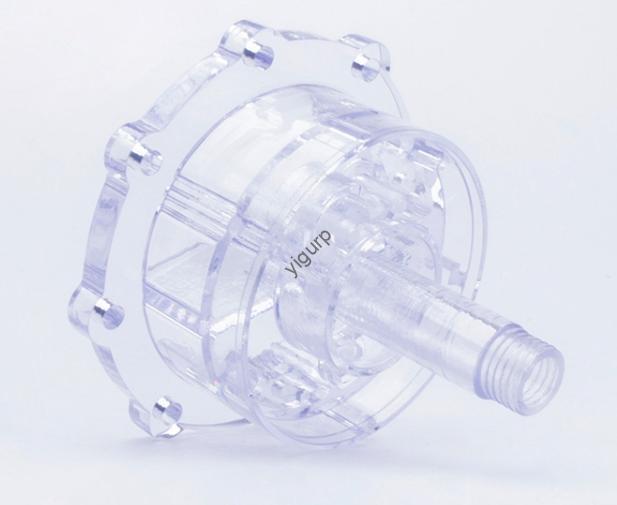
Se você é um engenheiro de produto em busca de um material que combine transparência, durabilidade, e versatilidade para impressão 3D, 3Impressão D em acrílico (usando polimetilmetacrilato, ou PMMA) é uma escolha superior. Este guia detalha tudo o que você precisa saber, desde suas propriedades destacadas até ajustes de impressão passo a passo, usos no mundo real, e precauções críticas - para que você possa obter resultados de alta qualidade, reliable prints every time.
1. Key Properties of 3D Printing Acrylic (PMMA)
What makes 3Impressão D em acrílico stand out from other 3D printing materials? Its unique combination of physical and thermal traits makes it ideal for both decorative and functional parts. Let’s explore the three most important properties, with data and examples to highlight their value.
1.1 Exceptional Transparency
Acrylic boasts 92% transmitância de luz—higher than most glass types (which typically have 80–85% transmittance). This means 3D-printed acrylic parts can be nearly clear, making them perfect for applications where visibility matters.
Exemplo do mundo real: A toy manufacturer switched from standard plastic to 3D printing acrylic for their “glow-in-the-dark” dollhouse windows. The acrylic windows allowed 30% more light to pass through, making the dollhouse’s internal LED lights brighter and more appealing to customers. Sales of the dollhouse increased by 25% within three months of the switch.
1.2 Strong Impact Resistance and Rigidity
Unlike fragile materials like glass or some resins, 3Impressão D em acrílico balances toughness and stiffness. It has an impact strength of 15–20 kJ/m² (compared to 5–8 kJ/m² for brittle resins) e um flexural modulus of 2.5–3.0 GPa—meaning it can withstand drops, bumps, and light pressure without breaking or bending permanently.
Exemplo do mundo real: An electronics startup used 3D printing acrylic to make protective covers for their portable speakers. When tested for drop resistance (a 1-meter drop onto concrete), 90% of the acrylic covers remained intact, while only 40% of plastic covers survived the same test. The acrylic covers also didn’t scratch easily, improving the speaker’s long-term durability.
1.3 Printable Temperature Range
3Impressão D em acrílico works with most standard 3D printers (FDM/FFF models) thanks to its manageable temperature range. No entanto, it does have specific thermal needs to avoid issues like warping. Here’s a quick breakdown of its critical thermal parameters:
| Thermal Parameter | Recommended Range | Por que é importante |
| Nozzle Temperature | 235°C – 250°C | Ensures acrylic melts evenly without burning (temperatures above 250°C cause discoloration). |
| Hot Bed Temperature | 100°C – 120°C | Prevents the print from lifting off the bed during printing (acrylic adheres best at this range). |
| Cooling Speed | Slow to Moderate | Acrylic shrinks 4–6% when cooling—slow cooling reduces warping and cracking. |
2. 3D Impressão Acrílica: Processo, Adjustments, and Post-Processing
Printing acrylic isn’t overly complex, but it does require specific adjustments to avoid common issues like warping or poor adhesion. Below’s a step-by-step guide to the printing process, plus tips for post-processing to boost quality.
2.1 Printing Process and Critical Adjustments
Even if you’re using a basic home 3D printer, you can successfully print acrylic by tweaking these key settings:
- Bed and Nozzle Temperature Setup:
Start with a nozzle temperature of 240°C (mid-range for acrylic) and a hot bed temperature of 110°C. Let the bed preheat for 10–15 minutes to ensure even heat distribution—this helps the first layer stick firmly.
Para dica: If you notice the first layer peeling, increase the bed temperature by 5–10°C. If the acrylic oozes too much from the nozzle, lower the nozzle temperature by 5°C.
- Printing Environment Control:
Acrylic shrinks significantly when cooled, so print in a confined space (like a printer enclosure) to keep the ambient temperature stable (ideally 22°C – 25°C). Avoid printing near open windows or fans—sudden temperature drops can cause parts to crack.
Exemplo do mundo real: A hobbyist tried printing an acrylic keychain without an enclosure. The part warped so much that the hole for the keyring closed up. After adding a simple cardboard enclosure, their next print had only 1% deformação, and the keyring hole stayed open.
2.2 Post-Processing for Better Finish and Transparency
Raw 3D-printed acrylic parts may have layer lines that reduce transparency. Use these two cost-effective post-processing methods to fix this:
- Acrylic Adhesive Polishing: Apply a small amount of acrylic adhesive (like MMA-based glue) to a soft cloth and gently rub the part’s surface. The adhesive melts the top layer slightly, filling in layer lines and boosting transparency. A jewelry maker used this method for their 3D-printed acrylic earrings—transparency increased by 15%, and the earrings looked “store-bought.”
- DIY Polishing Tools: Make a simple polisher using a Dremel tool and a felt wheel (costing less than $20 total). Run the wheel over the part at low speed (1,000–1,500 RPM) with a small amount of acrylic polish. This works well for larger parts like industrial machine covers—one manufacturer cut their polishing time by 50% compared to hand-sanding.
3. Top Applications of 3D Printing Acrylic
3Impressão D em acrílico is used across industries, thanks to its transparency, durabilidade, e capacidade de impressão. Below are the three most common application areas, with examples of how businesses are leveraging its strengths.
3.1 Toys and Crafts
Acrylic’s transparency and aesthetic appeal make it perfect for decorative items. Common uses include:
- Keychains and Figurines: A small craft business prints acrylic keychains with custom designs (like logos or cartoon characters). The clear acrylic lets the designs “pop,” and the material’s durability means the keychains don’t break easily—customer reviews note that the keychains last for years.
- Dollhouse and Miniature Parts: Como mencionado anteriormente, toy makers use 3D printing acrylic for windows, lampshades, and other tiny parts that need to be see-through. The material’s rigidity also ensures the parts don’t bend when kids play with them.
3.2 Aplicações Industriais
Em ambientes industriais, 3Impressão D em acrílico shines for functional parts that need both durability and transparency:
- Transparent Protective Covers: A manufacturing plant uses 3D-printed acrylic covers for their conveyor belt sensors. The covers protect the sensors from dust and debris while letting workers see if the sensors are working (via their LED lights). The acrylic covers last 18–24 months, compared to 6–8 months for plastic covers.
- Optical Components: A robotics company prints acrylic diffusers for their robot’s LED vision system. The diffusers spread light evenly, improving the robot’s ability to detect objects. Acrylic’s consistency (it has uniform light transmittance across the part) makes it better than plastic for this use case.
3.3 Medical and Scientific Research
Acrílico biocompatibilidade (it’s non-toxic and doesn’t react with most chemicals) and transparency make it a staple in labs and medical facilities:
- Laboratory Containers: A university lab uses 3D-printed acrylic test tube holders. The clear holders let researchers see how much liquid is in each tube, and the material’s chemical resistance means it doesn’t react with acids or bases.
- Medical Models: A dental clinic prints acrylic models of patients’ teeth to plan crowns and bridges. The transparent models let dentists see the shape of the teeth and the position of roots—something opaque plastic models can’t do. Patients also find the models helpful for understanding their treatment plans.
4. Critical Tips and Precautions for 3D Printing Acrylic
To get the best results with 3Impressão D em acrílico, follow these three key tips—they’ll help you avoid wasted material, broken parts, and safety risks.
4.1 Material Storage and Handling
Acrylic powder (or filament) absorbs moisture easily, which can cause bubbles in your prints. Para evitar isso:
- Store acrylic in an airtight container with desiccant packs (silica gel works well).
- Dry the material before printing: If using filament, run it through a filament dryer at 60°C for 2–3 hours. If using powder, spread it on a baking sheet and dry it in an oven at 50°C for 1 hora.
Consequence of Ignoring This: A research lab once used damp acrylic powder to print a test tube holder. The holder had 20+ bolhas, which weakened the material—when filled with test tubes, the holder cracked along a bubble line.
4.2 Safety Measures for High-Temperature Printing
3Impressão D em acrílico involves nozzle temperatures up to 250°C, so safety is a must:
- Vestir luvas resistentes ao calor (rated for 300°C+) when handling the printer bed or removing hot parts.
- Usar safety goggles to protect your eyes from melted acrylic splatters (cru, but possible if the nozzle clogs).
- Keep a fire extinguisher nearby—acrylic is flammable if it overheats (temperatures above 300°C can cause it to catch fire).
4.3 Troubleshooting Common Issues
Even with proper setup, you may run into small problems. Here’s how to fix the two most common issues:
| Common Issue | Causa | Solução |
| Warped Parts | Fast cooling or uneven bed temperature | Print in an enclosure; increase bed temperature by 5–10°C. |
| Poor Transparency | Layer lines or dirty material | Polish with acrylic adhesive; dry material thoroughly before printing. |
Yigu Technology’s Perspective on 3D Printing Acrylic
Na tecnologia Yigu, nós recomendamos 3Impressão D em acrílico for clients needing transparent, durable parts—from toy makers to medical labs. We help optimize printing setups: last month, we worked with a sensor company to adjust their acrylic print parameters, cutting warpage from 8% para 1% by tuning the bed temperature and adding an enclosure. For procurement teams, we source high-quality, low-moisture acrylic filament to reduce print failures. We also advise on post-processing—our go-to tip is acrylic adhesive polishing, as it’s cost-effective and boosts transparency without extra equipment.
FAQ About 3D Printing Acrylic
- Can I use 3D printing acrylic for outdoor parts?
Sim, but add a UV-resistant coating. Uncoated acrylic degrades in direct sunlight (it may turn yellow after 6–12 months). A UV coating (like clear acrylic spray paint) extends its outdoor life to 2–3 years. Por exemplo, a garden decor brand uses coated 3D-printed acrylic planters that stay clear for over 2 anos.
- Is 3D printing acrylic more expensive than standard plastic?
Slightly—acrylic filament costs \(25–)35 por kg, while PLA (standard plastic) custos \(15–)20 por kg. No entanto, the extra cost is worth it for transparency and durability. Por exemplo, a jewelry business found that acrylic earrings sold for 50% more than PLA earrings, offsetting the material cost.
- Can I recycle 3D-printed acrylic parts?
Sim! Acrylic is recyclable—you can grind old prints into powder and mix it with new acrylic material (até 20% recycled content) without losing quality. A manufacturing client of ours now recycles 15% of their acrylic waste, salvando $500+ per month on material costs.