
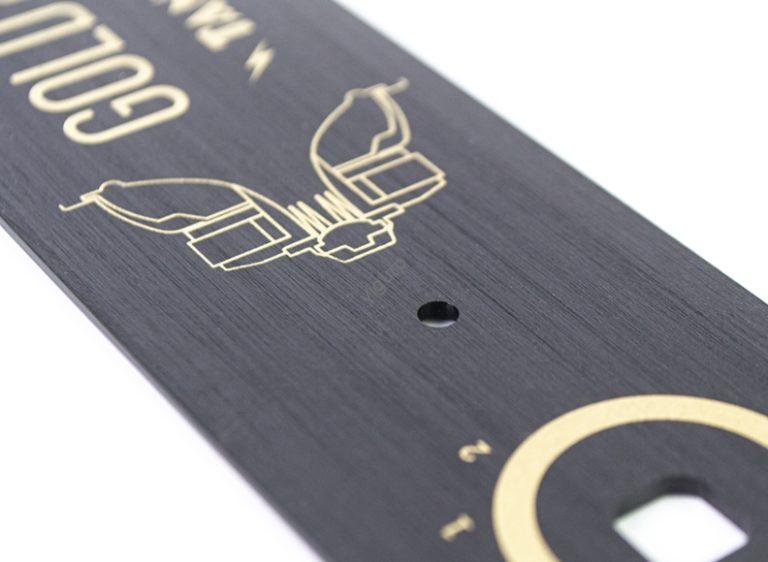
If you’re a product designer or engineer working on CNC plastic prototypes, potresti voler elevare l'aspetto della tua parte oltre una finitura lavorata di base. Trafilatura (detta anche spazzolatura) è la soluzione perfetta: crea benissimo, linee uniformi sulla superficie plastica, imitando la trama elegante delle parti in metallo spazzolato. This process not only boosts the prototype’s decorative appeal but also enhances its tactile feel, making it ideal for consumer electronics, elettrodomestici, or presentation-ready models. In questa guida, we’ll break down everything you need to know about wire drawing in CNC plastic prototype processing, dalla scelta dei materiali al collaudo finale, so you can achieve consistent, professional results.
What Is Wire Drawing in CNC Plastic Prototype Processing?
Primo, let’s clarify what wire drawing is and why it matters for your CNC plastic prototype. Wire drawing is a surface finishing technique that uses abrasive tools to scrape fine, parallel lines into the plastic surface. Unlike random scratches from sanding, these lines are intentional and uniform, creating a “brushed” texture that hides minor surface flaws (like small tool marks) while adding visual depth.
For CNC plastic prototypes, wire drawing offers three key benefits:
- Miglioramento estetico: It transforms plain plastic into a premium-looking part—great for client demos or market research samples.
- Tactile Improvement: The textured surface feels more substantial and less slippery than smooth plastic, which is a plus for handheld devices (per esempio., telecomandi, custodie per telefoni).
- Practicality: The brushed texture is more resistant to visible fingerprints than a glossy finish, keeping the prototype looking clean longer.
Fare un passo 1: Choose the Right Plastic Material for Wire Drawing
Not all plastics work well with wire drawing—some are too soft (leading to uneven lines) or too brittle (cracking during processing). The first and most critical step is selecting a plastic that’s compatible with the technique. Below is a breakdown of common CNC plastic materials and their suitability for wire drawing, plus key considerations.
| Plastic Material | Compatibility with Wire Drawing (1=Poor, 5=Excellent) | Key Properties for Wire Drawing | Ideal Line Density (Lines per Inch, LPI) | Ideale per (Prototype Types) |
| ABS | 5 (Eccellente) | Rigido, consistent hardness, low melt point (avoids tool overheating) | 80–120 LPI | Involucri elettronici, parti di giocattoli |
| computer (Policarbonato) | 4 (Very Good) | Elevata resistenza agli urti, resistente ai graffi (holds texture well) | 60–100 LPI | Display covers, safety gear |
| PMMA (Acrilico) | 4 (Very Good) | Trasparente (texture adds depth without hiding clarity) | 70–110 LPI | Decorative displays, involucri trasparenti |
| PP (Polipropilene) | 3 (Bene) | Flessibile (requires lighter tool pressure) | 50–80 LPI | Contenitori per alimenti, soft grips |
| POM (Acetale) | 2 (Giusto) | Hard but prone to tool chatter (uneven lines) | 40–60 LPI | Mechanical parts (only if texture is non-critical) |
| Silicone | 1 (Povero) | Too soft (lines smudge or disappear) | N / A | Not recommended for wire drawing |
Pro tip: Plastica ABS is the go-to choice for most wire-drawn CNC prototypes. È conveniente, facile da lavorare, and produces crisp, uniform lines. If you need transparency, opt for PMMA—but note that it may require slower tool speeds to avoid scratching the surface.
Fare un passo 2: Precision CNC Machining for the Base Prototype
Before wire drawing, you need a well-machined CNC plastic prototype. The wire drawing process enhances the surface, but it can’t fix major flaws (like uneven edges or deep tool marks). Follow these guidelines for CNC machining to ensure a smooth wire drawing workflow:
- Prioritize Surface Smoothness: Use a fine-end mill (0.5–1mm diameter) for the final CNC pass. This reduces initial surface roughness to Ra 1.6 μm or lower—the smoother the base, the more uniform the wire drawing lines.
- Avoid Over-Machining: Overheating during CNC machining can warp the plastic (especially ABS or PC), leading to uneven wire drawing. Keep spindle speeds between 10,000–15,000 RPM for ABS and 8,000–12,000 RPM for PC to prevent heat buildup.
- Cut to Exact Dimensions: Wire drawing removes a tiny layer of plastic (0.02–0.05mm) from the surface. Account for this by machining the prototype 0.03mm larger than the final desired size—this ensures the part meets specs after finishing.
Esempio: If your final prototype needs to be 100mm x 50mm x 5mm, machine it to 100.03mm x 50.03mm x 5.03mm before wire drawing.
Fare un passo 3: Surface Pretreatment—The Key to Uniform Lines
Even a well-machined prototype has small contaminants (like oil from machining or dust) that can ruin wire drawing results. Surface pretreatment ensures the plastic is clean and smooth, so the wire drawing tool glides evenly. Follow these three steps:
3.1 Clean the Surface
- Tools Needed: Isopropyl alcohol (70%+ concentrazione), lint-free microfiber cloths, compressed air.
- Processo:
- Use compressed air (low pressure, 30–40 PSI) to blow away loose dust from crevices.
- Dampen a microfiber cloth with isopropyl alcohol and wipe the prototype in straight lines (avoid circular motions, which can spread oil).
- Let the prototype air-dry for 10–15 minutes—alcohol evaporates quickly, so no rinsing is needed.
- Why It Matters: Oil or dust creates “skips” in the wire drawing lines—areas where the tool doesn’t make contact with the plastic, leaving blank spots.
3.2 Smooth Minor Imperfections
- Tools Needed: 400–600 grit sandpaper (wet/dry), sanding block, acqua.
- Processo:
- Wet the sandpaper (water reduces dust and prevents scratching) and wrap it around a sanding block (for even pressure).
- Sand the prototype surface lightly (1–2 passes per area) in the same direction you plan to draw the wires.
- Rinse the prototype with water and dry it with a clean cloth.
- Why It Matters: This step removes tiny tool marks or burrs that would otherwise show through the wire drawing texture.
Fare un passo 4: Wire Drawing Treatment—Creating the Texture
Now it’s time to create the wire drawing effect. You’ll need specialized tools (manuale o automatizzato) and careful control of speed and pressure to get uniform lines. Below is a breakdown of tools, parametri, and step-by-step execution.
4.1 Choose the Right Wire Drawing Tools
The tool you use depends on your prototype’s size, forma, and desired line density. Here’s a comparison of common options:
| Tool Type | Ideale per (Prototype Size/Shape) | Line Uniformity (1=Poor, 5=Excellent) | Processing Time (per 10cm² Area) | Fascia di costo |
| Manual Wire Brush | Piccole parti, tight corners | 3 (Bene) | 2–3 minutes | \(10–)30 |
| Electric Wire Drawing Machine | Large flat surfaces (per esempio., 10cm+ panels) | 5 (Eccellente) | 30–60 secondi | \(200–)500 |
| Rotary Abrasive Wheel | Curved surfaces (per esempio., rounded edges) | 4 (Very Good) | 1–2 minutes | \(50–)100 |
Nota: For most CNC plastic prototypes (di piccole e medie dimensioni), UN electric wire drawing machine is worth the investment—it’s fast and produces consistent lines. Per parti minuscole (per esempio., 2cm x 2cm buttons), a manual wire brush with fine bristles works best.
4.2 Set Up Tool Parameters
The right parameters (velocità, pressione, line direction) ensure crisp, even lines. Below are recommended settings for the most common tools and materials:
| Tool Type | Plastic Material | Tool Speed (RPM for Electric Tools) | Tool Pressure (Light/Medium/Heavy) | Line Direction (Relative to Prototype) |
| Electric Wire Drawing Machine | ABS | 1,500–2,000 RPM | Medio | Parallel to the longest edge of the part |
| Electric Wire Drawing Machine | computer | 1,200–1,800 RPM | Leggero | Parallel to the longest edge of the part |
| Manual Wire Brush | PMMA | N / A (Manual: 1–2 strokes per second) | Leggero | Diagonal (45°) for added visual interest |
| Rotary Abrasive Wheel | PP | 800–1,200 RPM | Leggero | Follow the curve of the part (per esempio., circular for rounded edges) |
Pro tip: Always test the tool settings on a scrap piece of the same plastic first. This lets you adjust speed or pressure before working on the actual prototype—saving you from costly mistakes.
4.3 Execute the Wire Drawing Process
Once your tools are set up and tested, follow these steps to draw wires on the CNC plastic prototype:
- Secure the Prototype: Use a clamp or vice with soft jaws (to avoid scratching the plastic) to hold the part in place. The surface to be drawn should be level—this prevents the tool from dipping or lifting (causing uneven lines).
- Start with a Test Pass: Run the tool over a small, less visible area of the prototype (per esempio., the back or bottom). Check the lines—if they’re too faint, increase pressure slightly; if they’re uneven, slow down the tool speed.
- Work in Continuous Strokes: Per superfici piane, move the tool in one continuous direction (no back-and-forth motions). Overlapping strokes by 50% ensures no gaps between lines. For curved surfaces, follow the part’s contour with the tool—use a rotary wheel for the most control.
- Monitor for Overheating: Plastica (especially ABS) can melt if the tool lingers in one spot. Pause every 30 seconds to touch the surface—if it’s warm (not hot), keep going. If it’s hot, let it cool for 1–2 minutes before continuing.
Fare un passo 5: Post-Processing to Refine the Texture
After wire drawing, the prototype needs light post-processing to clean up excess plastic dust and enhance the texture’s clarity. This step takes 15–30 minutes but makes a big difference in the final look.
5.1 Remove Dust and Debris
- Tools Needed: Soft-bristle brush (per esempio., a makeup brush), vacuum with a small nozzle.
- Processo:
- Gently brush the wire-drawn surface to loosen plastic dust—brush in the same direction as the lines to avoid smudging.
- Use the vacuum nozzle (on low power) to suck up loose dust. Avoid touching the surface with the nozzle (it can scratch the texture).
5.2 Light Sanding (Se necessario)
- When to Do It: If the lines have small “burrs” (tiny plastic bits sticking up), use 800-grit wet sandpaper to smooth them.
- Processo: Dampen the sandpaper and lightly sand along the lines (1 pass only). Rinse with water and dry—this removes burrs without fading the texture.
5.3 Optional Coating for Durability
- Why Coat: A clear coat protects the wire-drawn texture from scratches and fading. It’s especially useful for prototypes that will be handled frequently (per esempio., user testing models).
- Recommended Coats: Use a water-based acrylic clear coat (spray-on). Apply 1–2 thin coats (wait 10 minutes between coats) and let it cure for 24 ore. Avoid oil-based coats—they can darken the plastic and blur the lines.
Fare un passo 6: Inspection and Testing to Ensure Quality
The final step is quality inspection—you need to verify that the wire-drawn prototype meets your design requirements and will hold up to use. Use this checklist:
6.1 Ispezione visiva
- Controlla uniform line density: Use a ruler to measure lines per inch (LPI)—it should match your target (per esempio., 80–120 LPI for ABS).
- Look for flaws: No gaps, skips, or smudged lines. Hold the prototype up to light—light should reflect evenly along the lines (uneven reflection means uneven lines).
- Verify dimensions: Use a caliper to check if the part is still within your design specs (remember, wire drawing removes ~0.03mm of plastic).
6.2 Test funzionali
- Tactile test: Run your finger along the lines—they should feel smooth (no rough spots) e coerente.
- Wear test: Rub a dry microfiber cloth over the surface 50 times (with light pressure). The texture should stay intact (no fading or smudging).
- Chemical resistance test (se necessario): If the prototype will be exposed to liquids (per esempio., a water bottle prototype), wipe the surface with a damp cloth and let it dry. The texture should not warp or fade.
Common Mistakes to Avoid in Wire Drawing
Even experienced engineers make mistakes with wire drawing. Below are the most common issues and how to fix them:
| Common Mistake | Cause | Impact | Soluzione |
| Uneven lines | Tool pressure is too heavy in some areas | The texture looks messy and unprofessional | Use a sanding block for manual tools; adjust electric tool pressure to “medium” and keep speed consistent |
| Smudged lines | Plastic is too soft (per esempio., silicone) or tool speed is too high | Lines blur together, losing definition | Choose a stiffer plastic (per esempio., ABS); lower tool speed by 20–30% |
| Cracked plastic | Plastic is too brittle (per esempio., POM) or tool pressure is too high | The prototype is ruined (cracks can’t be fixed) | Switch to a more flexible plastic (per esempio., PP); use “light” tool pressure |
| Faded lines | Post-processing sanding is too aggressive | The texture becomes faint or disappears | Use 800-grit sandpaper (not coarser) and sand only 1 pass |
Yigu Technology’s Perspective on Wire Drawing for CNC Plastic Prototypes
Alla tecnologia Yigu, we see wire drawing as a cost-effective way to elevate CNC plastic prototypes from “functional” to “premium.” Our team optimizes the process by: 1) Pre-testing plastic materials to ensure compatibility (we recommend ABS for 90% of projects); 2) Using precision electric wire drawing machines (±5 RPM speed control) for uniform lines; 3) Adding a proprietary clear coat that boosts texture durability by 40% without blurring lines. For most CNC plastic prototypes, we complete wire drawing (from machining to coating) in 1–2 days. We also offer custom line densities (50–150 LPI) to match clients’ unique design needs—no extra cost for small adjustments.
Domande frequenti:
1. Can I do wire drawing on a 3D printed plastic prototype (not CNC machined)?
SÌ, but it’s trickier. 3D printed plastics (per esempio., FDM ABS) have layer lines that can interfere with wire drawing. Primo, fill the layer lines with a plastic filler (per esempio., Bondo Plastic Filler) and sand to Ra 1.6 µm. Then follow the same wire drawing steps—but use lighter tool pressure (3D printed plastic is more porous than CNC machined plastic). Note that the texture may not be as crisp as on a CNC prototype.
2. How long does the wire drawing process take for a typical CNC plastic prototype (per esempio., a 10cm x 10cm ABS panel)?
For a 10cm x 10cm ABS panel: Lavorazione CNC (1–2 ore) → pretreatment (15 minuti) → wire drawing (20–30 minutes) → post-processing (20 minuti) → inspection (10 minuti). Total time: ~2–3 hours (not including coating cure time, che è 24 ore). Per parti più grandi (per esempio., 30cm x 20cm), add 1–2 hours to the wire drawing step.
3. Can I change the line direction (per esempio., diagonal instead of parallel) for a unique look?
Assolutamente! Diagonal lines (45°) add visual interest and work well for decorative prototypes (per esempio., vetrine). For a “crosshatch” pattern, first draw lines in one direction (per esempio., 0°), let the prototype cool, then draw lines perpendicular (90°). Use the same LPI for both directions (per esempio., 80 LPI) and keep tool pressure light—crosshatching is more prone to unevenness if pressure is too heavy.