
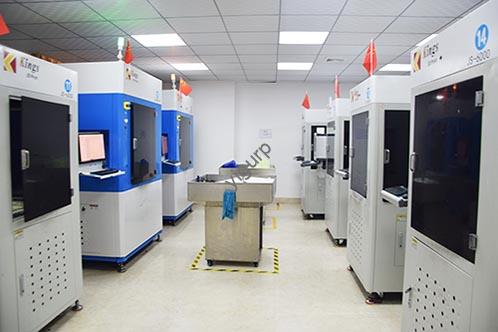
Se operi nel settore manifatturiero, aerospaziale, automobilistico, o assistenza sanitaria, you’ve probably heard about 3Stampa D—but industrial 3D printers are a world apart from consumer-grade models. A differenza delle tipografie hobbistiche che realizzano piccoli giocattoli o prototipi, i sistemi di livello industriale sono costruiti per la produzione pesante, precisione, e affidabilità. Trasformano i progetti digitali in parti funzionali, utensili, and even end-use products at scale. In questa guida, we’ll break down everything you need to know about industrial 3D printers, from their core features to how to choose the right one for your business.
Core Features of Industrial 3D Printers: Why They Stand Out
Industrial 3D printers aren’t just “bigger” than consumer models—they’re engineered for industrial environments where consistency and performance matter most. Here are their key characteristics, backed by real-world data and examples:
1. High Precision for Functional Parts
Precision is non-negotiable in industries like aerospace or medical device manufacturing. Most industrial 3D printers offer a layer resolution (the thickness of each printed layer) between 0.05mm and 0.1mm—far finer than consumer printers (which often start at 0.2mm). Per esempio:
- Stratasys’ F900 3D Printer (utilizzato nel settore aerospaziale) achieves a dimensional accuracy of ±0.127mm per 25.4mm, meeting strict aviation standards for parts like aircraft interior brackets.
- 3D Systems’ ProX 950 (for medical use) prints dental crowns with a precision of 0.02mm, garantendo una perfetta vestibilità per i pazienti.
This level of accuracy means parts work right out of the printer—no extra sanding or adjustment needed.
2. Large-Scale Printing Volumes
Industrial applications often require big parts: think automotive chassis components, aerospace engine housings, or industrial molds. Industrial 3D printers solve this with large build volumes. Below is a comparison of build sizes across common industrial models:
| Printer Model | Tecnologia | Build Volume (L x W x H) | Caso d'uso nel settore |
| EOS M 400-4 | SLS | 400 X 400 X 400 mm | Automobilistico: Printing engine parts |
| BigRep PRO | FDM | 1000 X 1000 X 1000 mm | Produzione: Large tooling |
| Formlabs Form 3L | SLA | 335 X 200 X 300 mm | Assistenza sanitaria: Orthopedic braces |
Per esempio, a construction company might use a large-format FDM printer to print concrete structural components up to 2 meters tall—something impossible with a consumer printer.
3. Diverse Printing Technologies for Every Need
Industrial 3D printers use multiple technologies, each optimized for specific materials and applications. Here’s a breakdown of the most common ones, con esempi del mondo reale:
- FDM (Modellazione della deposizione fusa): Melts thermoplastics (like ABS or nylon) and extrudes them layer by layer. Ideal for durable parts. Esempio: Ford uses FDM printers to make custom tooling for assembly lines, cutting tool production time by 50%.
- SLA (Stereolitografia): Uses a laser to cure liquid resin into solid parts. Great for high-detail prototypes. Esempio: Jewelry brands like Pandora use SLA to print intricate wax molds for casting gold and silver.
- SLS (Sinterizzazione laser selettiva): Sinters (fuses) materiali in polvere (like nylon or metal) con un laser. Perfect for strong, parti complesse. Esempio: Airbus uses SLS to print titanium brackets for its A350 aircraft, reducing part weight by 30%.
- 3DP (3D Printing/ binder jetting): Sprays a binder onto powder (metallo, sabbia, o ceramica) to build parts. Used for large-scale or low-cost production. Esempio: Caterpillar uses 3DP to print sand molds for casting heavy-duty engine parts.
4. Durability for 24/7 Operazione
Industrial environments are tough—dust, alte temperature, and non-stop use are common. Industrial 3D printers are built to handle this:
- Resistenza alle alte temperature: Many models have enclosures that withstand temperatures up to 200°C (critical for printing high-performance plastics like PEEK).
- Automated features: Self-cleaning nozzles, material detection sensors, and error recovery systems reduce downtime. Per esempio, the Markforged X7 has an automated bed leveling system that ensures consistent prints even after 100+ ore di utilizzo.
- Long lifespan: Industrial printers typically last 5–10 years (contro. 1–2 years for consumer models). Stratasys reports that their F123 series printers have an average uptime of 95%.
5. Software avanzato & Hardware Support
A printer is only as good as its support system. Industrial 3D printers come with tools to boost efficiency:
- Software: Programs like Stratasys Insight or EOSPRINT optimize print settings (per esempio., altezza dello strato, infill) to reduce material waste and speed up prints. Per esempio, a furniture manufacturer used EOSPRINT to cut print time for chair frames by 20%.
- Hardware add-ons: Heated build plates, multiple extruders (for printing with two materials), and integration with CAD software streamline workflows.
- Troubleshooting tools: Remote monitoring (via apps) lets engineers fix issues without being on-site. 3D Systems’ 3D Connect platform, ad esempio, alerts users to potential problems (like low material) in tempo reale.
6. Expert Service & Training
Buying an industrial 3D printer isn’t just a purchase—it’s an investment. Most manufacturers include:
- On-site training: Experts teach your team how to operate, maintain, and troubleshoot the printer. Per esempio, EOS offers 2-day training sessions for new users of their SLS printers.
- Maintenance services: Annual check-ups and 24/7 technical support. Stratasys guarantees a 4-hour response time for critical issues.
- Optimization help: Engineers work with you to refine your designs for 3D printing. A medical device company, Per esempio, used 3D Systems’ design services to make their surgical tools 15% più leggero.
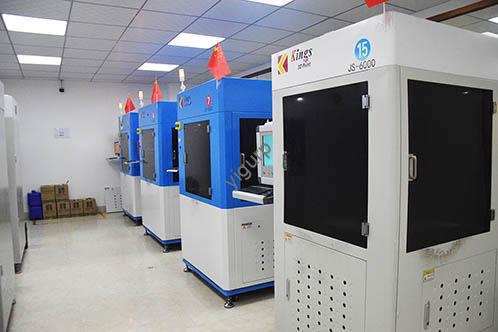
How to Choose the Right Industrial 3D Printer: 4 Fattori chiave
Con così tante opzioni, picking the right printer can be overwhelming. Ecco una guida passo passo per semplificare il processo:
1. Start with Your Budget
Industrial 3D printers range in price from \(10,000 (entry-level FDM models) A \)1,000,000+ (high-end metal SLS systems). Be realistic about what you can spend—don’t overinvest in features you don’t need. Per esempio:
- A small electronics company making prototypes might opt for a $20,000 Formlabs Form 3L (SLA).
- A large automotive manufacturer printing metal parts would need a $500,000 EOS M 400-4 (SLS).
2. Match the Printer to Your Printing Needs
Ask yourself three questions:
- What size parts will you print? If you need parts larger than 500mm, a BigRep PRO (FDM) or ExOne S-Max (3DP) is a better fit than a small SLA printer.
- How complex are your designs? Parti complesse (like dental implants) need SLA or SLS; parti semplici (like storage bins) work with FDM.
- What materials do you need? If you’re printing metal, choose SLS or binder jetting; per la plastica, FDM o SLA; for ceramics, 3DP.
Caso di studio: A dental clinic needed to print 10–15 crowns per day. They chose the Formlabs Form 3B+ (SLA) because it handles resin (used for crown molds) and has a fast print speed—each crown takes just 2 ore.
3. Prioritize Brand & After-Sales Service
A cheap printer with poor support will cost you more in downtime. Stick to well-known brands with a track record:
- Top brands: Stratasys, EOS, 3D Systems, Markforged, BigRep.
- What to look for in after-sales: 24/7 supporto, local service centers, and a warranty of at least 1 anno. Per esempio, Markforged offers a 2-year warranty on their X7 printer and has service centers in 20+ Paesi.
4. Do a Comprehensive Evaluation
Don’t buy without research:
- Read reviews: Sites like 3D Printing Industry or Additive Manufacturing Media publish unbiased reviews of industrial printers.
- Check user feedback: Ask other businesses in your industry. A aerospace supplier might tell you, “The EOS M 400-4 has been reliable for 3 years—we’ve had zero major issues.”
- Test the printer: Many manufacturers offer a demo print. Send them a design and see if the final part meets your standards.
Key Technologies Powering Modern Industrial 3D Printers
Nel frenetico mondo manifatturiero di oggi, industrial 3D printers are no longer just “nice-to-have”—they’re essential tools that bridge the gap from prototype to full-scale production. Whether you’re creating lightweight metal components for aerospace or durable plastic jigs for factory floors, the right industrial 3D printing solution can cut costs, speed up workflows, and unlock designs impossible with traditional manufacturing. Sotto, we break down everything you need to know to choose and use industrial 3D printers effectively.
Not all industrial 3D printers work the same way. Each technology has unique strengths, making it better suited for specific materials and applications. La tabella seguente confronta le opzioni più popolari, using data from leading manufacturers like Stratasys and Markforged.
| Tecnologia | Vantaggio fondamentale | Materiali ideali | Typical Use Cases | Velocità di stampa (contro. Concorrenti) |
| FDM (Modellazione della deposizione fusa) | High reliability, low cost-per-part | ASA, computer, ULTEM™ 9085, Carbon Fiber blends | Parti di produzione, jigs, infissi | Up to 2x faster (Stratasys F3300) |
| PolyJet | Multi-material, full-color printing | Resine Biocompatibili, VeroColor Resins | Parti dentali, modelli anatomici, prototipi | Rapido (48-hour turnaround for dental trays) |
| SLA (Stereolitografia) | Superior surface quality, alta precisione | Somos® WaterShed XC+, Somos® PerFORM | Utensileria, master patterns, fine-detail parts | 50% Più veloce (Neo®800+ model) |
| SAF (Selective Absorption Fusion) | Produzione in grandi volumi, coerenza | Nylon 11, Nylon 12, Polipropilene | Mass-produced plastic components | 10,000+ parti al mese (H350 model) |
| P3 (Powered by Programmable Photopolymerization) | Injection-mold precision | Resine ad alta temperatura, Elastomeri | Short-run production, dispositivi medici | Matches injection molding speed for small batches |
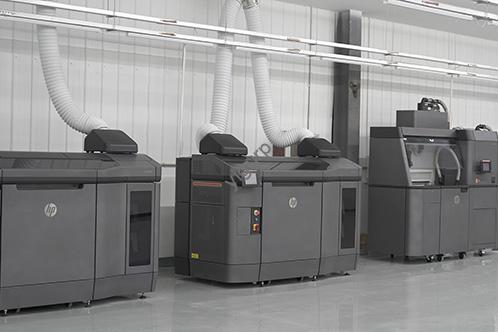
Why Industrial 3D Printers Outperform Traditional Manufacturing
Industrial 3D printing solves three big pain points for manufacturers: slow lead times, flessibilità progettuale limitata, and high tooling costs. Here’s how it delivers value—with real-world numbers:
- Time-to-Market più rapido: A leading aerospace company used the Stratasys F900 (Tecnologia FDM) to print Orion spacecraft hatch covers. What once took 6 weeks with traditional methods now takes 5 days—cutting lead time by 80%.
- Lower Cost Per Part: IL Stratasys H350 (SAF technology) produces nylon parts at \(0.50 per unità, rispetto a \)2.00 per unit with injection molding for batches under 10,000. Per la produzione in piccoli lotti, questo significa 75% risparmio sui costi.
- Unmatched Design Freedom: IL Markforged Metal X™ System lets manufacturers create complex metal structures (like lightweight gears with internal channels) that can’t be cast or machined. One automotive client reduced part weight by 40% while keeping strength the same—improving fuel efficiency for their vehicles.
Other key benefits include:
- Riduzione degli sprechi (only uses the material needed for the part)
- Easy customization (no need to retool for new designs)
- Produzione su richiesta (no need to store large inventories)
Top Industrial 3D Printer Models: Caratteristiche, Materiali, and Use Cases
Choosing the right printer depends on your materials, volume, e applicazione. Below are 5 industry-leading models, with details to help you match them to your needs.
Tavolo: Leading Industrial 3D Printer Models
| Model Name | Tecnologia | Key Materials Supported | Ideale per | Standout Feature |
| Stratasys F3300 | FDM | ASA, computer, FDM Nylon 12CF, ULTEM™ 9085 | High-speed industrial production | Up to 2x faster print speed than competitors |
| Stratasys Neo®800+ | SLA | Somos® WaterShed XC+, Somos® PerFORM | Large-format tooling and prototypes | 50% faster than older SLA models |
| Markforged FX20™ | FDM | ULTEM™ filament, Carbon Fiber blends | High-temperature, parti ad alta resistenza | Usable for aerospace and factory floor applications |
| Stratasys H350 | SAF | Nylon 11, Nylon 12, SAF ReLife™ PA12 | High-volume plastic production | Low cost-per-part ($0.50/unit average) |
| Stratasys J850™ Digital Anatomy | PolyJet | BoneMatrix™, GelMatrix™, TissueMatrix™ | Medical anatomical models | Lifelike texture that mimics real bone/tissue |
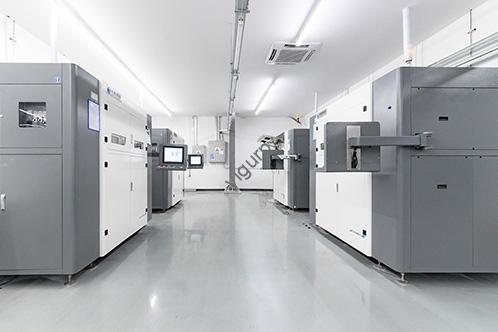
Applicazioni del mondo reale: How Industries Use Industrial 3D Printers
Industrial 3D printers aren’t one-size-fits-all—they adapt to different sectors. Ecco 4 common use cases with specific examples:
Aerospaziale & Difesa
- Caso: Lockheed Martin used the Stratasys F900 to print parts for the Orion spacecraft. The printer’s ability to handle ULTEM™ 9085 (a flame-retardant, high-strength material) meant parts met NASA’s strict safety standards. Il risultato? 30% lighter parts and a 40% reduction in production time.
Dental Labs
- Caso: A global dental lab switched to the Stratasys DentaJet® XL (PolyJet technology) for crowns and implant models. The printer’s auto-wash feature and biocompatible resins cut post-processing time by 50%. Ora, the lab produces 200+ dental parts per day—up from 120 with traditional methods.
Produzione automobilistica
- Caso: Ford uses the Markforged X7™ to print jigs and fixtures for its assembly lines. The carbon fiber-reinforced parts are 3x stronger than plastic alternatives and cost 70% less than metal tools. Ford estimates it saves $2 million per year in tooling costs.
Produzione di dispositivi medici
- Caso: A medical device company uses the Stratasys J5 MediJet to print surgical guides. The printer’s multi-material capability lets it create guides with both rigid (per precisione) e flessibile (per conforto) sections. Surgeons report a 25% reduction in surgery time when using these 3D-printed guides.
Key Data to Prove Industrial 3D Printing Value
Don’t just take our word for it—these numbers from leading manufacturers show why industrial 3D printers are a smart investment:
- Patents: 1,000+ global patents issued in the last decade (proof of ongoing innovation).
- Materiali: 130+ 3D printing materials available (from plastics to metals to biocompatible resins).
- Daily Production: 500,000+ production parts made daily by customers (showing real-world scalability).
- Risparmio sui costi: Average 30–70% reduction in tooling costs vs. manifattura tradizionale.
- Speed Gains: 50–80% faster lead times for prototypes and small-batch production.
Yigu Technology’s Perspective on Industrial 3D Printers
Alla tecnologia Yigu, we believe industrial 3D printers are a game-changer for manufacturers aiming to be agile and cost-effective. They eliminate the need for expensive molds (cutting upfront costs by 40–60%) and let businesses make small batches of parts on demand—perfect for custom products or rapid prototyping. We’ve worked with clients in automotive and healthcare to integrate industrial 3D printers into their workflows: one auto parts maker reduced lead time for tooling from 4 settimane a 3 days using an FDM printer. Con l’avanzare della tecnologia, we expect more manufacturers to adopt industrial 3D printing—especially as materials become more affordable and printers more user-friendly.
FAQ About Industrial 3D Printers
1. How long does it take to print a part with an industrial 3D printer?
Print time depends on size, complessità, e tecnologia. A small SLA prototype (per esempio., a 50mm toy) richiede 1-2 ore, while a large FDM tool (per esempio., a 1m assembly jig) può richiedere 24-48 ore. Metal SLS parts (come le staffe aerospaziali) often take 10–15 hours due to slower laser sintering.
2. Can industrial 3D printers print with recycled materials?
SÌ! Many industrial printers support recycled thermoplastics (like rABS or rPET) per FDM, and some SLS printers can use recycled metal powders. Per esempio, BigRep’s PRO printer works with recycled nylon, helping manufacturers reduce waste and lower material costs.
3. Are industrial 3D printers difficult to operate?
While they’re more complex than consumer models, modern industrial printers are designed to be user-friendly. Most come with intuitive software (per esempio., Stratasys Insight) that guides you through settings, and manufacturers offer training to help your team get up to speed. Many also have remote monitoring tools, so you can manage prints from a computer or phone.