
1. Lavorazione pre-CNC: Preparation and Design for Printer Prototypes
Prima di iniziare Lavorazione CNC for the printer prototype, è essenziale una fase sistematica di preparazione e progettazione per allinearsi alle esigenze funzionali e produttive. Questa fase segue una sequenza lineare, con i principali dettagli organizzati nella tabella seguente.
| Design Step | Requisiti chiave | Recommended Materials |
| Product Demand Analysis | Clarify core parameters: Determine printer type (inkjet/laser), misurare (per esempio., A4 desktop: 400×300×150mm), and functional layouts (feeder capacity, paper exit tray size, cartridge bin compatibility); ensure structural stability for moving parts like gear sets and paper rollers. | – |
| Part Splitting | Divide the printer model into machinable components: Alloggiamenti (upper/lower), feeders, paper exit trays, cartridge bins, gear sets, and circuit board mounts. Ensure each part has no overhangs that hinder CNC machining. | – |
| 3Modellazione D | Use CAD software (SolidWorks, UG NX) to create 3D models with precise dimensions. Highlight critical features: Gear tooth profiles (modulo 0.5-1), feeder roller grooves (depth 2-3mm), and circuit board mounting holes (diameter 3-4mm). Add draft slopes (3°-5°) for future mold compatibility. | – |
| Selezione dei materiali | Choose materials based on part function, lavorabilità, e costo. Prioritize compatibility with mass production processes. | Housings/Feeders: Plastica ABS (basso costo, facile da lavorare, resistente agli urti); Gear Shafts/Brackets: Lega di alluminio (alta resistenza, resistente all'usura); Transparent Windows: Acrilico (chiaro, resistente ai graffi); Gear Sets: POM (basso attrito, buona stabilità dimensionale). |
| Material Pretreatment | Cut raw materials into blanks (leave 2-3mm machining allowance); Anneal aluminum alloy (300-350°C per 1-2 ore) per ridurre lo stress interno; Clean plastic sheets with alcohol to remove surface contaminants. | – |
2. Core CNC Machining Process for Printer Prototypes
IL CNC machining process is the bridge between 3D models and physical prototype parts. It requires strict control over programming, clamping, and cutting to ensure precision and functionality.
2.1 CAM Programming and Toolpath Design
Scientific programming determines machining efficiency and part quality. The table below outlines key steps and parameters:
| Programming Step | Key Actions | Recommended Software & Utensili |
| Model Import & Coordinate Setup | Import 3D models (STEP/IGS format) into CAM software; Set machining origin (align with part center for symmetrical components like housings). | Mastercam, PowerMill |
| Toolpath Generation | – Roughing: Use large-diameter tools (φ10-12mm flat cutters) to remove 80-90% of excess material; Leave 0.5-1mm finishing allowance.- Finitura: Use small-diameter tools (φ0.5-1mm ball cutters) per i dettagli (denti dell'ingranaggio, button grooves); Set cutting depth to 0.1-0.2mm per pass.- Corner Cleaning: Use φ2-3mm end mills to remove residue in complex corners (per esempio., cartridge bin edges). | – Roughing: Acciaio rapido (HSS) cutters- Finitura: Carbide cutters |
| Parameter Setting | Adjust rotational speed, velocità di avanzamento, and cutting depth based on material: | – |
| – Lega di alluminio: 8000-10000 giri al minuto, 300-500 RPM feed rate- Plastica ABS: 4000-6000 giri al minuto, 200-300 RPM feed rate- POM: 5000-7000 giri al minuto, 250-350 RPM feed rate | – |
2.2 Clamping and Machining Execution
Proper clamping prevents part displacement, while precise execution ensures dimensional accuracy.
2.2.1 Clamping Guidelines
- Fixture Selection:
- Use vises with soft jaws for aluminum alloy blocks (avoids surface scratches).
- Use vacuum suction cups for thin plastic sheets (per esempio., 2-3mm ABS housings) to ensure even pressure.
- Use custom jigs for irregular parts (per esempio., gear sets) to maintain alignment during machining.
- Symmetrical Part Handling: For upper/lower housings, use double-sided clamping (machine one side, flip, and re-calibrate) to ensure left-right symmetry (error ≤±0.05mm).
2.2.2 Machining Execution Steps
- Roughing: Focus on speed—use layer-by-layer milling to shape the part’s basic outline (per esempio., housing outer edges, feeder slots). Avoid excessive cutting force (max 50N for plastic) to prevent deformation.
- Finitura: Prioritize precision—machine critical features first (denti dell'ingranaggio, fori di montaggio). For threaded holes (M2-M4), use taps (for plastic) or thread milling cutters (for metal) to ensure smooth screw installation.
- Special Processing:
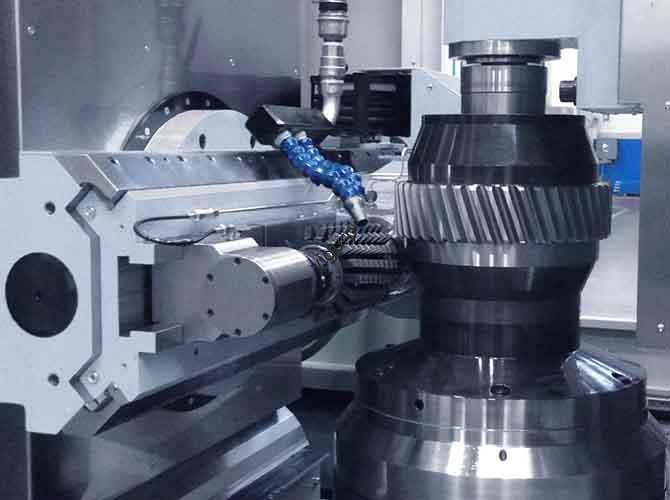
- Use gear mills to machine gear tooth profiles (ensure tooth pitch error ≤±0.02mm).
- Use 4-axis linkage machining for curved surfaces (per esempio., paper exit tray edges) to achieve consistent curvature.
2.3 Quality Inspection During Machining
Conduct in-process checks to catch defects early:
- Controllo dimensionale: Use calipers (for outer dimensions) and micrometers (for gear shafts, tolerance ±0.01mm) after each process.
- Surface Quality Check: Use a stylus roughness meter to verify surface finish (Ra ≤1.6μm for visible parts like housings).
- Feature Verification: Use go/no-go gauges to test threaded holes and slot widths (ensure they match assembly requirements).
3. Post-lavorazione: Surface Treatment and Finishing
Dopo la lavorazione CNC, targeted surface treatment enhances the prototype’s appearance, durabilità, e l'esperienza dell'utente.
3.1 Deburring and Polishing
- Sbavatura:
- Use 400-mesh sandpaper to remove machining burrs on plastic parts; per parti metalliche, use a file (round for holes, flat for edges).
- Use compressed air (0.5-0.8 MPa) to blow out debris from small holes (per esempio., fori di montaggio del circuito stampato).
- Lucidatura:
- For aluminum alloy parts: Use vibration grinding (1-2 ore) to achieve a matte finish; for high-gloss effects, perform mechanical polishing (con 800-1200 mesh sandpaper).
- Per parti in plastica: Use a wool wheel with polishing paste to reduce visible machining marks.
3.2 Material-Specific Surface Treatment
Different materials require tailored treatments to meet design goals, as shown in the table:
| Materiale | Metodo di trattamento superficiale | Scopo & Effect |
| Lega di alluminio | Sabbiatura + Anodizzazione | Sabbiatura (80-120 mesh grit) creates a uniform matte texture; anodizzazione (thickness 5-10μm) aggiunge resistenza alla corrosione (salt spray test ≥48 hours) and color options (nero, argento). |
| Plastica ABS | Pittura + Serigrafia | Spray matte/gloss paint (2-3 coats, dry time 12-24 ore) per l'estetica; silk screen brand logos, button symbols (per esempio., “Power,” “Paper Feed”), and warning text (prova di adesione: no peeling after 100 tape pulls). |
| Acrilico | Incisione laser | Engrave transparent windows with scale marks (per esempio., feeder paper capacity) without affecting clarity; add anti-fingerprint coating (reduces smudges by 60%). |
| POM Gears | Oil Coating | Apply food-grade lubricating oil (per esempio., silicone oil) per ridurre l'attrito (extends gear life by 30%) e funzionamento silenzioso. |
4. Assembly and Testing of Printer Prototypes
Scientific assembly and rigorous testing ensure the prototype meets functional and user requirements.
4.1 Assembly Process
Follow this step-by-step sequence to avoid errors:
- Pre-Assembly Check:
- Use a coordinate measuring machine (CMM) to inspect critical dimensions (per esempio., gear center distance, tolerance ±0.03mm).
- Test-fit threaded holes and snap structures (ensure no interference—gap ≤0.1mm).
- Component Installation:
- Housing Assembly: Fasten upper and lower housings with M3 screws (coppia 1.5-2 N·m) to ensure even fit (no gaps).
- Structural Parts: Install feeders and paper exit trays; secure with snaps (for plastic) or screws (for metal brackets). Adjust feeder roller alignment (ensure paper travels straight).
- Moving Parts: Mount gear sets and cartridge bins; add lubricant to gear teeth. Adjust gear meshing (backlash ≤0.05mm) to prevent jamming.
- Elettronica: Install circuit boards; connect wires (use crimp connectors for reliability). Ensure sensor alignment (per esempio., paper detection sensor, position error ≤0.5mm).
- Final Check: Verify all parts are securely fastened; check for loose components (no rattling during shaking).
4.2 Testing Procedures
Conduct comprehensive tests to validate performance:
- Appearance Inspection:
- Check color consistency (ΔE ≤1.5) and surface defects (no scratches >0.5mm, ≤1 blemish per 100cm²).
- Verify logo/symbol clarity (no smudging or misalignment).
- Structural Testing:
- Paper Handling: Test paper feed (100 sheets of A4 paper, 80g/m²) for fluency (no jams, paper skew ≤1mm).
- Gear Transmission: Run gear sets at 500 Numero di giri per 1 ora; check for wear (tooth damage ≤0.01mm) and noise (≤55 dB).
- Cartridge Compatibility: Insert and remove cartridges 20 times; check for smooth operation (no stuck issues).
- Functional Verification:
- For electronic prototypes: Test circuit connections (no short circuits), sensor responses (paper detection time ≤0.1s), and indicator lights (accurate status display).
- Simulate printing (per esempio., inkjet test pattern): Check print quality (no streaks, text clarity ≥300 DPI).
5. Optimization and Iteration
Address issues found during testing to improve the prototype:
- Problem Logging:
- Record defects (per esempio., dimensional deviations, assembly interference, graffi superficiali) with photos and specific measurements (per esempio., “Housing gap 0.2mm at left edge”).
- Ottimizzazione della progettazione:
- Modify 3D models: Adjust part size (per esempio., increase gear tooth thickness by 0.1mm), add chamfers (C1) to reduce burrs, or simplify snap designs (ease assembly).
- Regenerate CAM programs: Update toolpaths for optimized parts (per esempio., adjust cutting depth for thinner walls).
- Secondary Processing:
- Rework defective parts (per esempio., re-machine oversize holes, polish scratch marks).
- Replace non-functional components (per esempio., worn gears, faulty sensors).
6. Output Results and Documentation
Deliver a complete prototype package with useful documentation:
- Prototipi: Functional printer prototypes for demonstrations, user testing, or low-volume trial production (10-50 unità).
- Technical Documents:
- 3D model files (STEP/IGS) and 2D drawings (DXF).
- CNC machining programs (Codice G) and tool lists (cutter type, diametro, life).
- Assembly drawings (with part numbers and torque specifications) and inspection reports (CMM data, risultati dei test).
- Feedback Report: Summarize challenges (per esempio., “Aluminum alloy deformation during machining”) and solutions (per esempio., “Increased annealing time to 2 ore”); suggest mass production improvements (per esempio., “Switch to injection molding for ABS housings”).
7. Key Precautions
To ensure process efficiency and prototype quality:
- Controllo di precisione: CNC machining accuracy is ±0.05mm, but account for material behavior—aluminum alloy expands (add +0.02mm tolerance), plastic shrinks (add -0.03mm tolerance).
- Cost Balance: CNC is ideal for small-batch prototypes (1-100 unità); per la produzione di massa (>1000 units), switch to injection molding (plastica) or die casting (metalli) to reduce costs by 50-70%.
- Safety: Wear safety glasses and gloves during machining; use fume extractors when spraying paint or anodizing (avoids toxic exposure).
Yigu Technology’s Viewpoint
Alla tecnologia Yigu, crediamo CNC machining is the backbone of high-quality printer prototype development. It enables precise replication of complex structures (per esempio., gear sets, feeder mechanisms) and supports rapid iteration—critical for printer products where functional accuracy (per esempio., paper feed, gear meshing) directly impacts user experience. When executing this process, we prioritize two core aspects: material-function matching (per esempio., POM for low-friction gears, aluminum alloy for sturdy brackets) e ottimizzazione dei processi (per esempio., 4-axis machining for curved surfaces, in-process CMM checks to avoid rework). By integrating strict quality control at every stage—from design to testing—we help clients shorten prototype cycles by 20-30% and mitigate mass production risks. Looking ahead, we will leverage AI-driven CAM programming to further enhance machining efficiency while maintaining ±0.03mm precision, supporting faster innovation for printer brands.
Domande frequenti
- What materials are best for CNC machined printer prototype parts, e perché?
The best materials depend on part function: ABS plastic for housings (basso costo, resistente agli urti); aluminum alloy for brackets/gear shafts (alta resistenza, resistente all'usura); POM for gears (basso attrito, quiet operation); and acrylic for transparent windows (chiaro, easy to engrave). These materials balance machinability, funzionalità, and compatibility with mass production processes.
- Can a CNC machined printer prototype be used directly for mass production?
NO. CNC prototypes are for design verification, test funzionali, and user feedback—they are not cost-effective for mass production (>1000 unità). For large-scale manufacturing, processes like injection molding (per la plastica) or die casting (per metalli) replace CNC machining, as they reduce per-unit costs by 50-70% and increase production speed by 3-5 times.
- How long does it take to make a CNC machined printer prototype from design to testing?
The timeline depends on complexity: A simple desktop printer prototype (ABS housing, basic gears) takes 10-14 giorni (3-4 days design, 4-5 days CNC machining, 2-3 days surface treatment, 1-2 days assembly/testing). A complex laser printer prototype (aluminum alloy parts, ingranaggi di precisione) takes 15-20 giorni, as it requires more intricate machining and testing.