
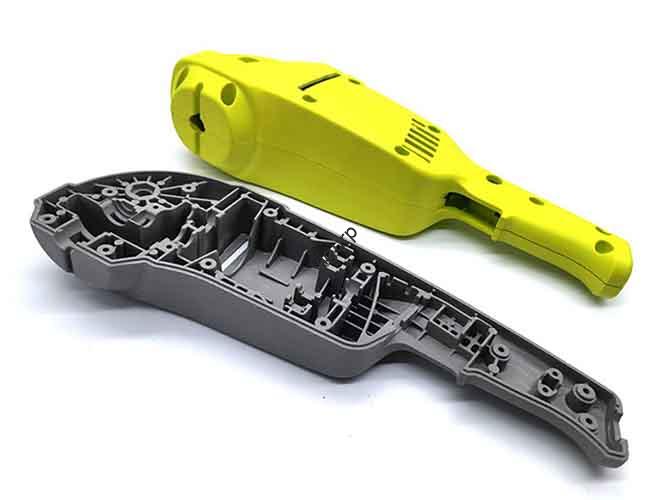
Fused Deposition Modeling (FDM) is a key part of modern additive manufacturing. It’s simple, affordable, and flexible—changing how engineers, designers, and businesses create parts. This guide breaks down FDM from basics to real-world use. It explains how it works, what materials to use, how to optimize settings, and where it fits with other 3D printing tech. By the end, you’ll know how to use FDM to speed up prototyping, make custom parts, and cut costs.
What Are FDM Basics?
FDM is a type of 3D printing that builds parts layer by layer. It uses melted plastic filament to create real objects from digital files. It’s not just for hobbyists—it’s a tool for professionals across industries.
Key Terms to Know?
To understand FDM, you need to know how it fits in the additive manufacturing world. Think of it like this:
- Additive Manufacturing (AM): The big category—building parts layer by layer from digital data. It’s the “vehicle.”
- 3D Printing: The common term for AM, used by consumers and small businesses. It’s the “car.”
- FDM: A specific type of AM that uses plastic filament. It’s the “sedan.” The general term is FFF (Fused Filament Fabrication).
FDM is trademarked by Stratasys, but many people use it to mean any filament-based 3D printing.
How Does FDM Work?
The process is simple in theory, but precise in practice. Here’s a step-by-step breakdown:
A spool of solid plastic filament feeds into a heated extruder. The extruder melts the filament. It pushes the melted plastic through a small nozzle.
The printer moves the extruder in X, Y, and Z directions. It traces the cross-section of the object, laying down thin lines of plastic.
Each layer cools and hardens fast. It sticks to the layer below it. This repeats until the part is done.
Why Is FDM Important?
FDM’s value comes from its versatility and ease of use. It has changed manufacturing in four big ways:
- Fast Prototyping: Turns designs into physical models in hours, not weeks. Engineers test shape, fit, and function quickly.
- Custom Tools: Makes on-demand manufacturing aids. These improve efficiency for assembly and machining.
- Small-Batch Production: Affordable end-use parts without costly injection molding tooling.
- Accessibility: Low cost brings manufacturing power to small businesses, schools, and individuals.
Market data backs its growth. Grand View Research says FDM is the largest segment of the AM market by units sold. It will keep growing as materials and hardware get better.
What Is the FDM Process?
From digital idea to real part, FDM follows five clear steps. Mastering these steps ensures consistent, high-quality results.
Step 1: Digital Blueprint?
Everything starts with a 3D model. You create this with CAD software (like Fusion 360 or SolidWorks).
Save the model as an STL or OBJ file. This file turns the object’s surface into a mesh of triangles.
Import the mesh into slicer software (like Cura or PrusaSlicer). Slicers cut the model into hundreds of horizontal layers.
The slicer creates G-code—machine instructions for the printer. You set layer height, infill, speed, and temperatures here.
Step 2: Machine Prep?
Prepare the printer before printing. Clean and level the build plate (where the part sits).
For warp-prone materials, use adhesive (like glue sticks) to help the first layer stick.
Mount the filament spool. Feed the filament into the extruder until it reaches the heated nozzle.
Step 3: Heating & Printing?
Load the G-code and start printing. The hot end (heating block + nozzle) melts the filament.
Nozzle temperatures vary: ~200°C for PLA, over 400°C for high-performance plastics.
The printer moves the extruder in X/Y to trace the first layer. Then it moves up in Z (layer height) and repeats.
Step 4: Cooling?
Melted plastic cools and hardens fast, sticking to the layer below. Cooling rate is critical.
Most FDM printers have a part cooling fan. It blows air on new layers for sharper details and faster prints.
Too much cooling weakens layer bonds. Find the right balance for your material.
Step 5: Finishing?
Let the part cool completely after printing. Remove it from the build plate (use a scraper if needed).
Remove support structures. Breakaway supports snap off. Soluble supports dissolve in solvent.
Finish steps: Sand to smooth layer lines, vapor smooth (ABS), or paint for a better look.
What FDM Materials to Use?
Material is FDM’s “fuel.” The right choice determines cost, strength, and performance. Below are the most common options.
Standard Plastics?
Affordable and easy to use—great for prototyping and hobby projects.
- PLA: Most popular. Easy to print, no heated bed needed. Minimal warping, many colors. Biodegradable.
- ABS: Stronger and more heat-resistant than PLA. Used in LEGO. Needs heated bed and enclosed chamber.
- PETG: Balances PLA’s ease and ABS’s strength. Good chemical resistance. Food-safe grades available.
High-Performance Plastics?
Engineering-grade materials for demanding applications. Need specialized high-temp printers.
- Nylon (PA): Tough, durable, low-friction. Good for gears and living hinges.
- PC: One of the strongest FDM materials. High impact and heat resistance. Good for harsh environments.
- PEEK/PEKK: Ultra-performance. Metal-like strength, extreme heat/chemical resistance. Used in aerospace/medical.
Flexible & Composite?
Extend FDM beyond rigid plastics. Create parts with unique properties.
- TPU/TPE: Rubber-like. Flexible, impact-absorbent. Good for seals and phone cases.
- Composites: Base plastics mixed with fibers (carbon/glass). Carbon fiber boosts stiffness. Wood/metal-filled for looks.
Material Comparison?
| Material | Key Properties | Common Uses | Print Requirements |
|---|---|---|---|
| PLA | Easy to print, rigid, biodegradable | Visual prototypes, concept models | 190-220°C nozzle, no heated bed |
| ABS | Strong, durable, heat-resistant | Functional parts, protective housings | 230-260°C nozzle, 100-110°C bed, enclosure |
| PETG | Strong, chemical-resistant, low shrinkage | Mechanical parts, food-safe containers | 230-250°C nozzle, 70-80°C bed |
| Nylon | Tough, flexible, wear-resistant | Gears, living hinges, tooling | 240-270°C nozzle, heated bed, moisture-sensitive |
| PC | Very strong, high impact/heat resistance | Functional prototypes, protective gear | 260-310°C nozzle, >110°C bed, enclosure |
| TPU | Flexible, rubber-like, impact-absorbent | Seals, gaskets, flexible prototypes | Specific speeds, direct drive extruder |
| Carbon Fiber | Stiff, high strength-to-weight | Jigs, fixtures, high-performance parts | Hardened steel nozzle (abrasive) |
How to Optimize FDM Settings?
Great FDM results come from fine-tuning settings. Move beyond defaults to fix problems and get better parts.
Speed vs. Quality?
You can optimize for two of three: speed, quality, strength. Not all three.
Print Speed: Faster = less time, but more ringing and weak layers. Slower = stronger bonds.
Nozzle Temp: Critical. Too hot = stringing. Too cold = weak layers or jams. Use a temperature tower to find the sweet spot.
How to Boost Strength?
Strength depends on material and how it’s placed.
Infill Density: 20-40% is often enough. Gyroid/honeycomb patterns are stronger than grids.
Wall Thickness: More perimeters (walls) = stronger parts. 4 walls are better than 20-50% infill.
Perfect First Layer?
90% of print failures come from first-layer issues. Focus on these:
Bed Temp: Needed for ABS/Nylon to prevent warping (corners lifting).
Z-Offset: Distance between nozzle and bed. Too high = no stick. Too low = clogs. Aim for “perfect squish.”
Adhesion Aids: Brims/rafts help large parts. 10-15 line brim + enclosure = less ABS warping.
Improve Appearance?
For good-looking parts, adjust these two settings:
Layer Height: Smaller (0.1mm) = smoother, slower. Larger (0.3mm) = faster, rougher.
Cooling Fan: Helps details, but turn off for first layers. 40-60% speed for most materials.
How Does FDM Compare?
FDM is one of many AM technologies. Compare it to SLA and SLS to choose the right process.
FDM vs. SLA?
SLA uses UV lasers to cure liquid resin. It makes parts with finer details and smoother surfaces than FDM.
FDM wins on material strength and cost. FDM plastics are stronger than standard SLA resins. Machines and materials are cheaper.
FDM vs. SLS?
SLS uses lasers to fuse polymer powder. No supports needed—unfused powder holds parts.
SLS makes complex geometries impossible with FDM. Parts are strong and consistent. But SLS machines are much more expensive.
Process Comparison?
| Feature | FDM | SLA | SLS |
|---|---|---|---|
| Core Tech | Extrude thermoplastic filament | Cure photopolymer resin | Sinter polymer powder |
| Cost | Low (Machine & Material) | Medium | High |
| Resolution | Low to Medium | Very High | Medium to High |
| Material Variety | Very High | Medium | Medium |
| Part Strength | Good to Excellent | Fair to Good | Excellent |
| Ideal Uses | Prototypes, jigs, functional parts | High-detail models, visual prototypes | Complex geometries, end-use parts |
Real-World FDM Uses?
FDM solves problems across industries. It speeds up innovation and cuts costs in real applications.
FDM Across Industries?
- Aerospace: Custom jigs, non-critical cabin parts. High-performance materials (ULTEM/PEEK) are certified.
- Automotive: Dashboard mockups, custom tools, robot tooling. Reduces costs and lead times.
- Medical: Patient-specific surgery models, prosthetic prototypes, surgical guides.
- Consumer Goods: Functional prototypes for power tools, appliances. Refine designs before injection molding.
Case Study: Custom Drone Mount?
This example shows FDM’s power for agile product development.
Challenge: An engineering team needed a drone sensor mount. It had to be light (preserve flight time), strong (withstand vibration), and ready in 3 days for a field test.
Why FDM?: Fast iteration, no tooling cost, and material variety. Machining was too slow/expensive.
Process:
- Iteration 1 (PLA): Printed in 2 hours. Checked fit—found clearance issue with drone arm.
- Iteration 2 (PETG): Adjusted CAD, reprinted. Fit well, but static test showed weak point.
- Final (Carbon Fiber-Nylon): Reinforced design. Composite material = stiff and light.
Outcome: Concept to field-tested part in 48 hours. Material cost <$20. FDM enabled fast iteration and optimization.
What’s the Future of FDM?
FDM is mature but still evolving. Innovations in materials, hardware, and software are expanding its use.
Material Innovations?
- Continuous Fiber: Embed carbon/glass/Kevlar for aluminum-like strength-to-weight ratio.
- Advanced Polymers: Bio-compatible materials for medical implants and tissue engineering.
Hardware & Software?
- Faster Printing: New systems print 5-10x faster without losing quality.
- AI Slicing: AI optimizes settings automatically, eliminating guesswork.
- Accessible Features: Multi-material printing and heated chambers on affordable printers.
FDM in Manufacturing 4.0?
FDM is moving from prototyping to production. It enables distributed manufacturing—print parts on-demand, close to where they’re needed. This revolutionizes supply chains and inventory.
Conclusion
Fused Deposition Modeling is a versatile, affordable 3D printing technology. It’s perfect for rapid prototyping, custom tools, small-batch production, and more. By understanding its process, materials, and settings, you can use FDM to speed up innovation and cut costs.
FDM’s strength lies in its accessibility and flexibility. It’s not the best for every job—choose SLA for detail or SLS for complexity. But for most functional parts and prototypes, FDM is the best balance of cost and performance.
As FDM evolves, it will play an even bigger role in manufacturing. It’s a tool that empowers businesses of all sizes to turn ideas into reality quickly and affordably.
FAQ
Is FDM the same as 3D printing? No. FDM is a type of 3D printing (additive manufacturing). 3D printing is the general term; FDM uses filament extrusion.
What’s the cheapest FDM material? PLA is the cheapest and easiest to print. It’s great for beginners and non-functional prototypes.
Can FDM make functional parts? Yes. Use engineering-grade materials (PETG, Nylon, PC) for strong, durable functional parts.
How long does FDM printing take? It depends on size and settings. Small parts take hours; large/complex parts take days.
Do I need special training to use FDM? No. Beginners can learn basics in hours. Fine-tuning takes practice, but it’s easy to get started.
Is FDM better than SLA/SLS? It depends on your needs. FDM is best for low-cost, strong parts. SLA for detail, SLS for complexity.
Discuss Your Projects with Yigu Rapid Prototyping
At Yigu Rapid Prototyping, we specialize in FDM and other 3D printing technologies. Our team helps you choose the right materials, optimize settings, and turn your digital designs into high-quality physical parts. Whether you need rapid prototypes, custom tools, or small-batch production, we have the expertise to deliver. Contact us today to discuss your project and get a tailored FDM solution.