
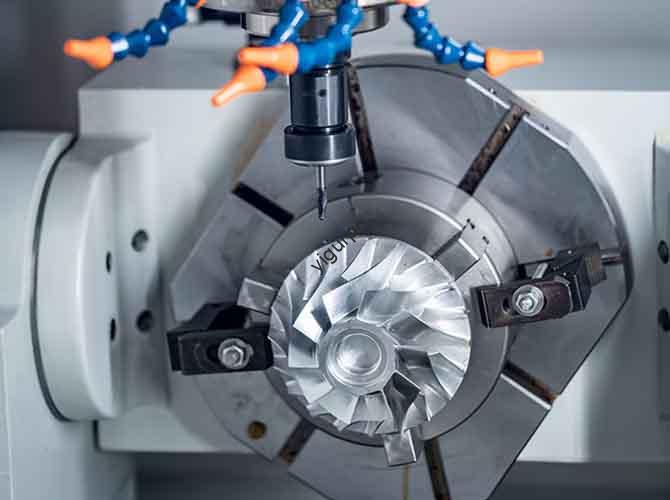
Dans le monde manufacturier en évolution rapide d’aujourd’hui, comment les usines produisent-elles des pièces complexes avec une précision et une efficacité constantes? The answer lies in automatic CNC machining—a technology that has revolutionized how we create components for industries from aerospace to medical devices. Ce guide détaille tout ce que vous devez savoir sur ce processus révolutionnaire, from its basic structure to real-world applications.
1. What Is Automatic CNC Machining?
À la base, automatic CNC machining uses computer numerical control (CNC) systems to automate machine tool movements, eliminating the need for constant manual adjustment. Contrairement à l'usinage manuel traditionnel, which relies on human skill to guide tools, CNC machining follows preprogrammed instructions to deliver repeatable, des résultats de haute qualité.
Key Components of an Automatic CNC Machining System
The system cannot function without four critical parts. The table below outlines their roles:
| Component | Primary Function |
| Machines-outils CNC | Execute physical machining tasks (par ex., coupe, forage, fraisage) on raw materials. |
| CNC Control System | Interpret program code and send signals to control tool speed, position, et vitesse d'avance. |
| Programming Software | Create G-code (le langage des machines CNC) using 3D models (par ex., CAD software outputs). |
| Skilled Operators | Monitor operations, troubleshoot errors, and adjust parameters for optimal performance. |
2. 3 Unbeatable Advantages of Automatic CNC Machining
Why do manufacturers worldwide choose automatic CNC machining over traditional methods? Here are three non-negotiable benefits:
- High Automation: Une fois programmé, Les machines CNC peuvent fonctionner 24/7 avec une intervention humaine minimale. Par exemple, a medical device factory can produce 500+ precision surgical screws in a single shift—something manual machining could never match.
- Exceptional Precision: CNC systems operate with tolerances as tight as ±0.001 inches (0.0254 mm). This level of accuracy is critical for aerospace parts, where even a tiny error could lead to catastrophic failures.
- Strong Flexibility: Need to switch from making a aluminum bracket to a stainless steel gear? Simply update the program—no need to retool the entire machine. This cuts setup time by 50% or more compared to traditional machining.
3. The Step-by-Step Automatic CNC Machining Process
Creating a part with automatic CNC machining follows a linear, repeatable workflow. Think of it like baking a cake: you need the right recipe (programme) and steps to get a consistent result.
- Design Modeling: Utiliser Logiciel de CAO (par ex., SolidWorks, AutoCAD) to build a 3D digital model of the part. This model acts as the “blueprint” for machining.
- Data Conversion: Export the CAD model to a format CNC machines understand, tel que STL (Standard Tessellation Language) or STEP. This step ensures the machine can “read” the design.
- Tranchage & Programmation: Use CAM (Fabrication assistée par ordinateur) software to slice the 3D model into 2D layers (like slicing a loaf of bread). The software then generates G-code—specific instructions for the machine’s tools.
- Layer-by-Layer Machining: The CNC machine follows the G-code to remove material (par ex., via milling or turning) couche par couche, shaping the raw material into the desired part.
- Post-traitement: Finish the part with tasks like sanding (to smooth surfaces), ébavurage (to remove sharp edges), ou peinture (pour la résistance à la corrosion).
4. Automatic CNC Machining vs. Traditional Machining: A Clear Comparison
Is automatic CNC machining worth the investment? Let’s compare it to traditional manual machining using key metrics:
| Metric | Usinage CNC automatique | Traditional Manual Machining |
| Précision | Tolerances of ±0.001–±0.005 inches | Tolerances of ±0.01–±0.05 inches (dépend de la compétence de l'opérateur) |
| Production Speed | 2–5x faster for high-volume runs | Lent; limited by human reaction time |
| Labor Requirement | 1 operator can monitor 3–5 machines | 1 operator per machine |
| Cost for Complex Parts | Inférieur (no retooling for design changes) | Plus haut (requires custom tools for each part) |
5. Yigu Technology’s Perspective on Automatic CNC Machining
Chez Yigu Technologie, we see automatic CNC machining as the backbone of modern manufacturing innovation. Au cours de la dernière décennie, we’ve helped 200+ clients—from automotive startups to medical device makers—adopt CNC solutions that cut production costs by 30% and improve part quality by 40%.
The biggest pain point we solve? Small-batch production inefficiencies. Many manufacturers worry CNC is only for large runs, but our tailored programs let clients produce 10–500 parts cost-effectively. As technology advances (par ex., AI-powered CNC systems), we’ll keep making this tool more accessible to drive industry growth.
FAQ: Your Top Automatic CNC Machining Questions Answered
Q1: What materials can be used in automatic CNC machining?
A1: Almost any rigid material works, including aluminum, acier, titane, plastique (par ex., ABS), bois, and even some ceramics. The choice depends on the part’s use (par ex., titanium for high-strength aerospace parts).
Q2: How long does it take to program a CNC machine for a new part?
A2: Pour les pièces simples (par ex., a basic bracket), programming takes 1–2 hours. Pour pièces complexes (par ex., a medical implant with curved surfaces), it may take 4–8 hours—still faster than creating custom tools for traditional machining.
Q3: Is automatic CNC machining suitable for small businesses?
A3: Oui! Many CNC providers (comme la technologie Yigu) offer scalable solutions. Small businesses can start with a single machine and short-run programs, avoiding large upfront investments while still enjoying CNC’s accuracy and speed.